
April 25, 2025: New AllStar node; TD-H8 radio; RF in the shack; Amateur Radio Newsline on my node; Inovato Quadra updating; Zero Retries Digital Conference; ham radio, geology, and flying!
In this issue of the Random Wire:
What is the Random Wire about? Being clear about what we do and what we expect is a wonderful gift.
Featured link: East Coast Reflector. The ECR is a linked and bridged network of repeaters and nodes that spans many of the systems amateur radio operators use.
New AllStar node and device. I have a new plug-and-play AllStar node by AllScan, and a USB Radio Interface for building another node.
New TD-H8 radio. I compare the TIDRADIO TD-H8 with its smaller sibling, the TD-H3, including side-by-side size, display, and audio comparisons.
RF returning to the shack. A story I caught during a net reminded me of turning on my daughter’s lamp with my HF radio.
AR Newsline added to my local node. I set up a node to download the Amateur Radio Newsline file each week.
My chargers frequently go walkabout. Am I the only ham who can’t seem to keep track of handheld radio chargers?
Inovato Quadra HamClock upgrade problems. The vendor cautions users about upgrading older Quadra units, and I’m getting an error when I update/upgrade.
Help me with voicemail on AllStar? There must be a way to implement voicemail on an AllStar node but I’m not finding any clear guides to help me figure it out.
Suddenly, my router was not the master. I updated my router and it stopped working after automatic reboots because of a Samba conflict.
Reminder: Zero Retries Digital Conference. Simply a reminder to pencil this inaugural September conference into your calendar.
Ham radio, flying, and geology! Three of my favorite topics come together in a great 30-minute YouTube video.
This just in. Late-breaking tidbits that surfaced while I was writing this issue.

What is the Random Wire about?
I’m a generalist. I know a little about a lot of things, and a lot about very few things. I love to learn new things every day. In my amateur radio universe, I try to chronicle such learning experiences in the Random Wire Review newsletter. I believe that when we share what we are doing, we encourage others to share their experiences, creating even more opportunities to learn.
Occasionally, I produce “how to” items I call TechNotes. Find those at https://www.randomwire.us/t/technote.
My background leans heavily to information technology, so it won’t come as a surprise that I tend to focus on some of the newer digital and internet-connected systems. Those marry my computer and networking backgrounds with amateur radio. AllStar was one of the first internet-connected systems I dove into, so AllStar features prominently in Random Wire newsletters. You’ll also find some computer-related content, but amateur radio is really the main focus, even when I’m talking about systems that support my amateur radio hobby.
I don’t ignore radios that use RF. Whether it is the handie talkie I use to connect with a hotspot or node, or my Yaesu C4FM mobile radio in the pickup truck, I use RF radios every day. Most of my RF-leaning content has been about VHF/UHF radios, but I continue to look for time to return to more HF operating. I do have HF radios and antennas, but I don’t have as much time as I would like for that aspect of the hobby.
I’m sharing this with you because with every newsletter, I lose some subscribers and gain some subscribers. And that is fine. This is not a contest for me. Numbers matter far less than creating content that is interesting and sharing it with a community of people who also like to learn from each other.
If you are going to unsubscribe, would you do me a favor and send me a note? I’d like to know what you would like to read. What makes it worth your time to subscribe? Your feedback will help me provide better content, but more importantly, you’ll also be helping other subscribers get the kind of content they will find interesting. Hit the button below or find other ways to reach me at https://www.randomwire.us/about.
To be crystal clear: I don’t make a living writing the Random Wire newsletter. (However, you can support the newsletter in several ways, if you so choose, and I thank everyone who has provided support). For me, this is about providing content that other amateur radio operators find interesting, and learning from each other. In so doing, I learn new things, too.

Featured link: East Coast Reflector
The East Coast Reflector is the featured link for this issue. Their welcome page lays out basic information and usage guidelines. But what is the ECR? In their words:
The East Coast Reflector is a linked/bridged network of repeaters, nodes, and technologies that provide amateur radio operators with a convergence of platforms where users of various systems such as AllStar, IRLP, D-Star, DMR, Yaesu System Fusion, EchoLink, Hamshack Hotline, and Hams Over IP can seamlessly communicate across the country and around the world.
I listen to their Tech-Net at 8:00 pm Eastern on Tuesday evenings. If I’m up early enough (I am on the West Coast, after all), I catch their Morning Brew net that runs from 7:00 to 9:00 am Eastern, Monday through Friday.
There are many ways to connect and participate, as shown in their system diagram:
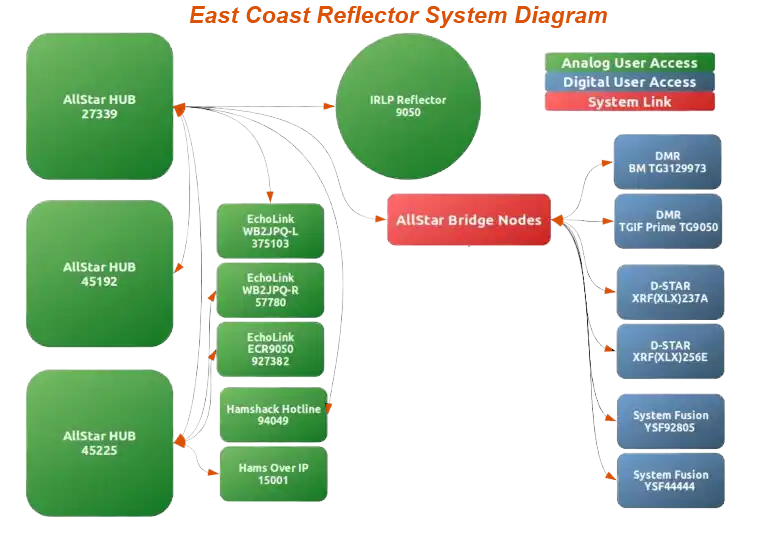
This chart is found at the bottom of their welcome page, followed by a table that shows the same information in a different way.
I will say that I’ve learned a lot by listening to their nets. Because there are so many different systems, the audio quality can be variable, but amateur radio operators are used to this.
Stop into the East Coast Reflector sometime, using your preferred amateur radio system, and maybe learn something new!

New AllStar node and device
By the time RWR issue 128 is published, my two newest AllStar devices from AllScan will be here. One is a complete, turnkey node. The other is a URI (USB Radio Interface) UCI120 (USB Communications Interface) that I’ll add to a microcomputer, probably one of my Dell Wyse 3040 thin client machines.
New AllScan ANH100
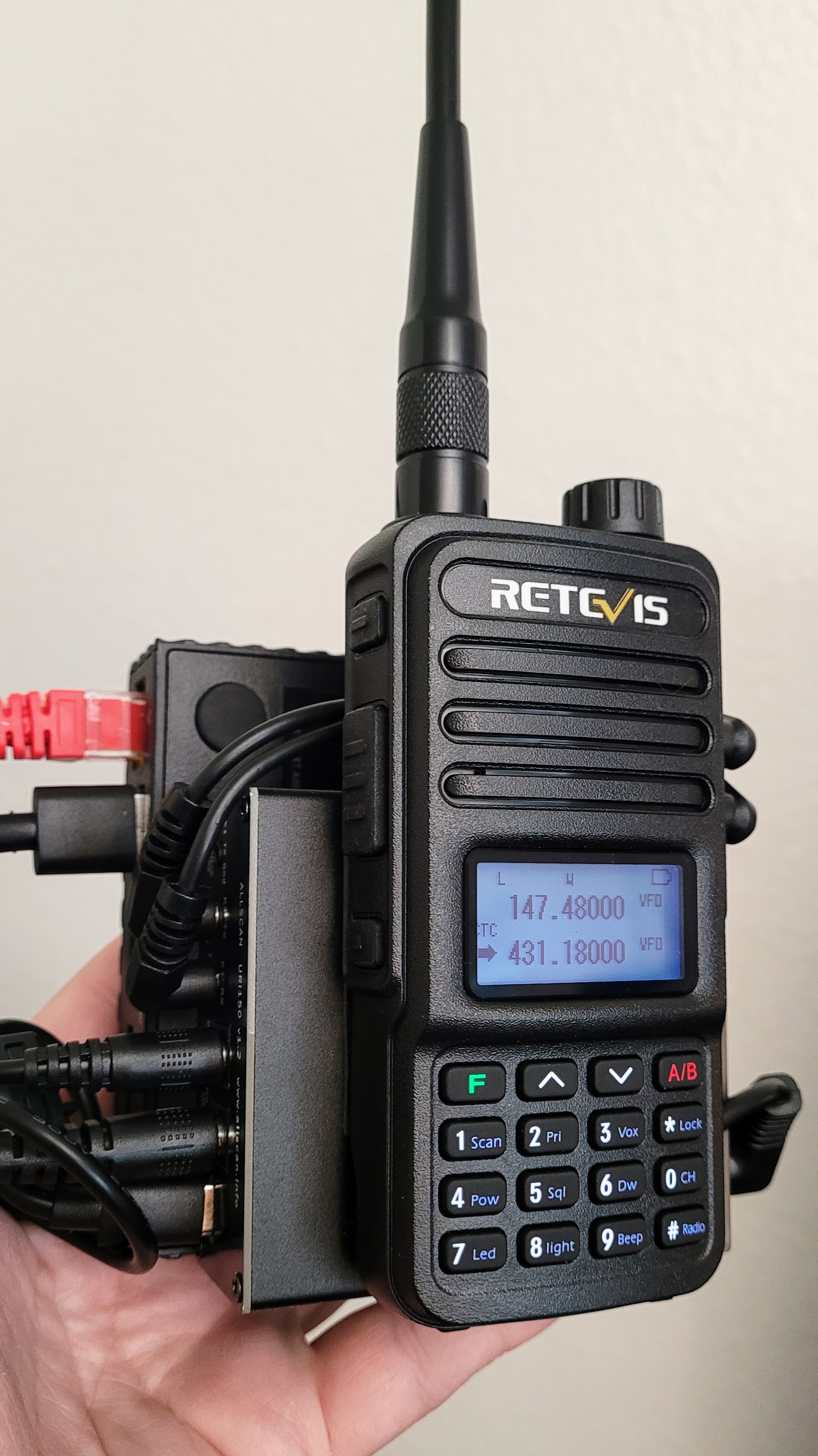
My new AllStar node 578493 is an AllScan ANH100 built around an AllScan URI150 with a Retevis RT85 radio and a Dell Wyse 3040 micro PC. Because I have so many nodes, I couldn’t use the default IAX port of 4569, so this one runs on port 4566 UDP.
In the photo below, I’m also testing a different antenna on the RT85 radio. I bought a taller Retevis antenna with a bit more gain for the node radio to help when out walking around. At $9.99, it seemed worth trying out.
The node has three parts: the radio, the URI, and the micro PC. In the photo, I’m holding the entire package in my hand.
Here’s what David Gleason NR9V, the builder, said about this node (and about my previously purchased ANH100 built with a URI141):
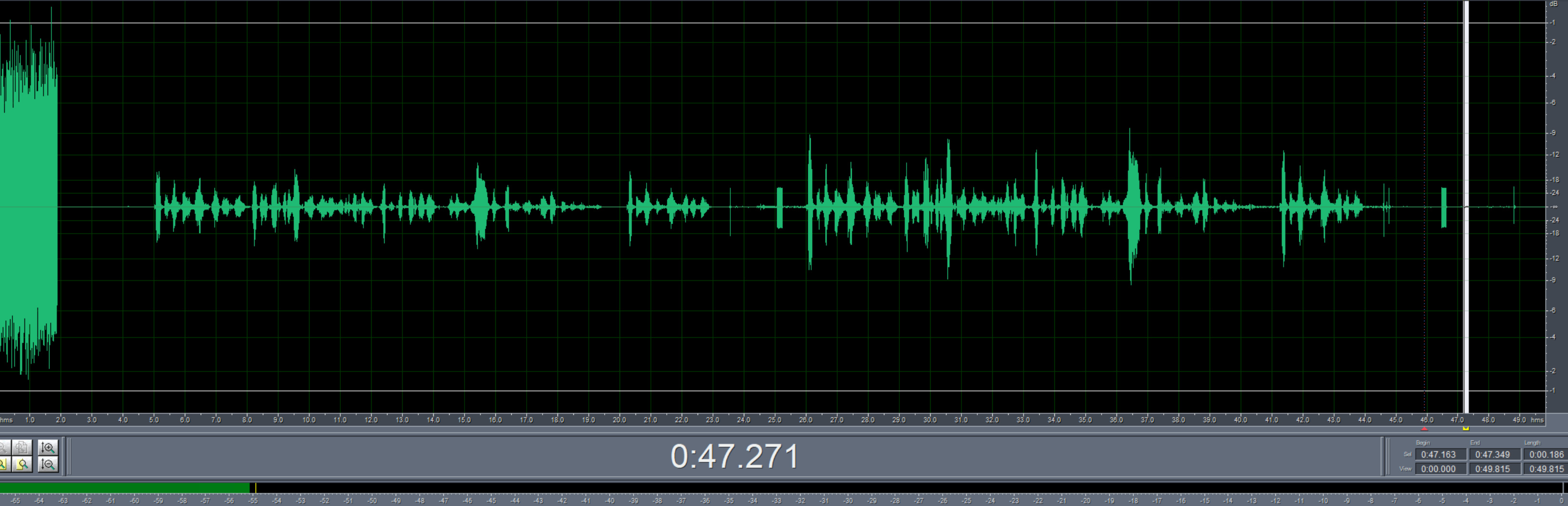
Attached test files show 55dB (round-trip parrot test) SNR on this node. On your ANH100 w/URI141 I measured 54dB, but these measurements are +/-~1dB accuracy and there is likely no audible difference. 54/55 dB ANR is as high as I’ve seen on any node so it doesn’t get any better than that.
The signal-to-noise ratio waveform for the new node looks great:
And the audio sounds great:
The audio quality for these AllScan ANH100 nodes is outstanding. With the newest node built with the URI150, I also have the option of converting it to a full-duplex node in the future. I anticipate this node is going to be a rock solid piece of kit for my suite of amateur radio tools and devices.
So what was it like to unbox and put the new node into service? It was smooth sailing. In about 15 minutes, I had the box open, the node plugged into my network, powered on, and working.
I set the squelch on the node radio to just below clipping, then used DTMF *690 to get the LAN IP address. My handheld radio was already set for the node’s frequency and tone.
Following all of David’s clear instructions very carefully, I had the node running and tested on the Enhanced Parrot node 55553 within 15 minutes of opening the box. The node sounds great.
At low power (1.5 watts), I get very clear audio reception for at least one-quarter mile from the node on a handheld radio. I also tuned my mobile radio in my pickup truck to the node frequency and find I can receive understandable audio for about two miles in a hilly urban environment.
I’m just very impressed. What a great it-works-right-out-of-the-box experience. I’m sure it helped that I had messed with the first node, and in doing so, learned a lot. That did make the plugging in, powering up, and minor configuring go very quickly with this second node. But the biggest takeaway after my experience with the first node is: just follow David’s directions — all of them! — in order. When I did that with the second node, it was all smooth sailing.
I did install a few additional packages. I install Tailscale on all my nodes to make it easier to access and manage the nodes from afar. I also installed mlocate to help me find directories and files. Finally, I installed and configured the Uncomplicated Firewall (UFW) to provide another layer of protection against intrusions.
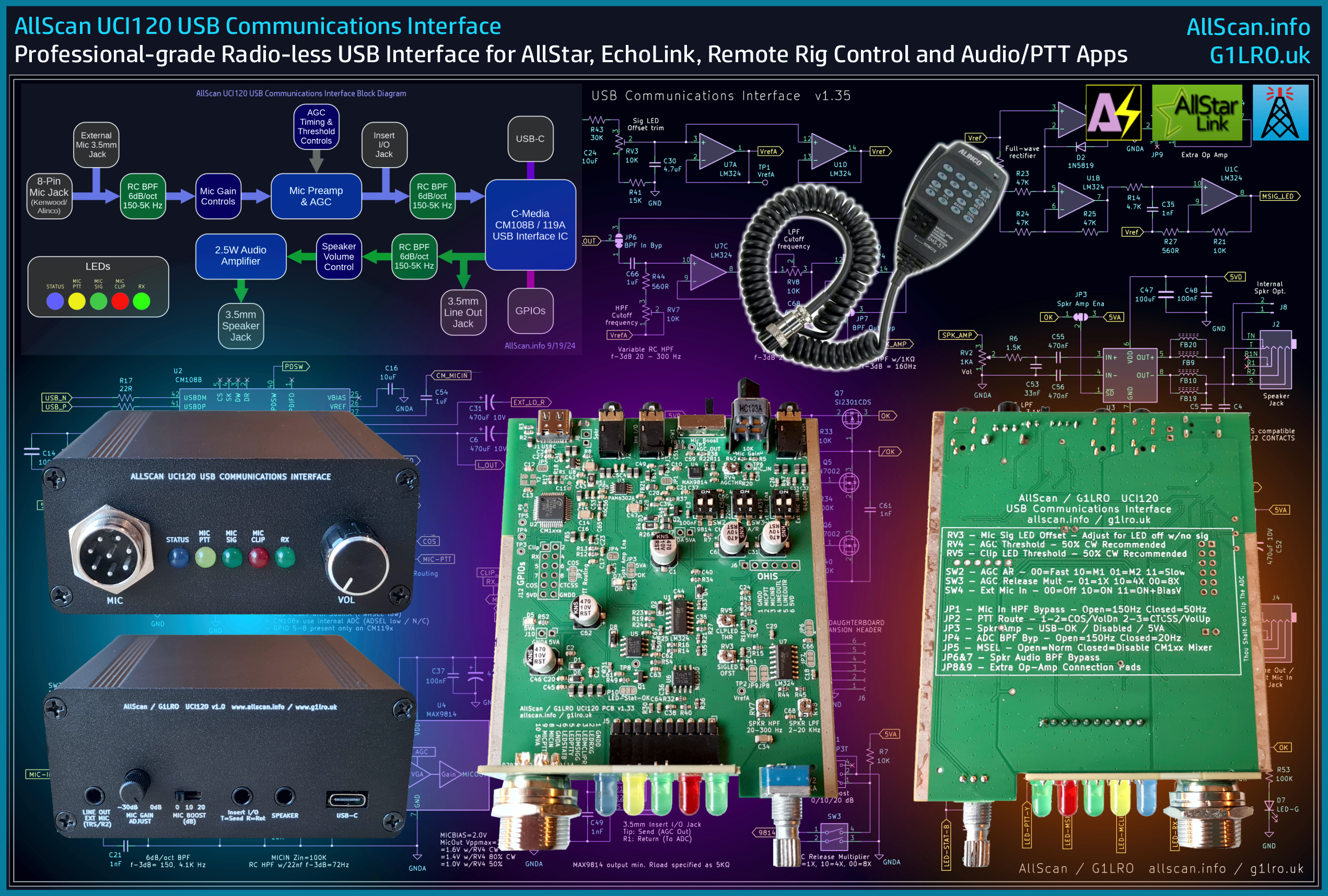
UCI120 USB Communications Interface
I also bought a UCI120 USB Communications Interface. The detailed product page is available at https://allscan.info/products/uci120/. I already have one that I use for my desktop node 588412 and it works brilliantly. I have plans for the new UCI120 but I may try some different things with it as I get to know all the things it can do. David has a great graphic that let’s you see how the UCI120 works.
Here is a 39-second video of node 588412 with the UCI120 interface receiving the ARRL Audio News and piping the audio to an old Heathkit HS-1661 speaker. The audio is quite good.
AllScan products deliver
If you are looking for components to build a high-quality AllStar node yourself, or you want a complete plug-and-play solution, or you want a way to scan your favorites for activity so you can more easily participate in nets, check out the great products from AllScan. David is focused on audio quality and his products deliver. I’m a fan.

New TD-H8 radio
At the suggestion of a subscriber (thank you, Roger!), I’m trying the larger TIDRADIO TD-H8 handie talkie. What follows is not an exhaustive review of the TD-H8. Instead, I’m sharing my first impressions and some comparisons with its smaller sibling, the TD-H3.
Size, display, buttons, clip
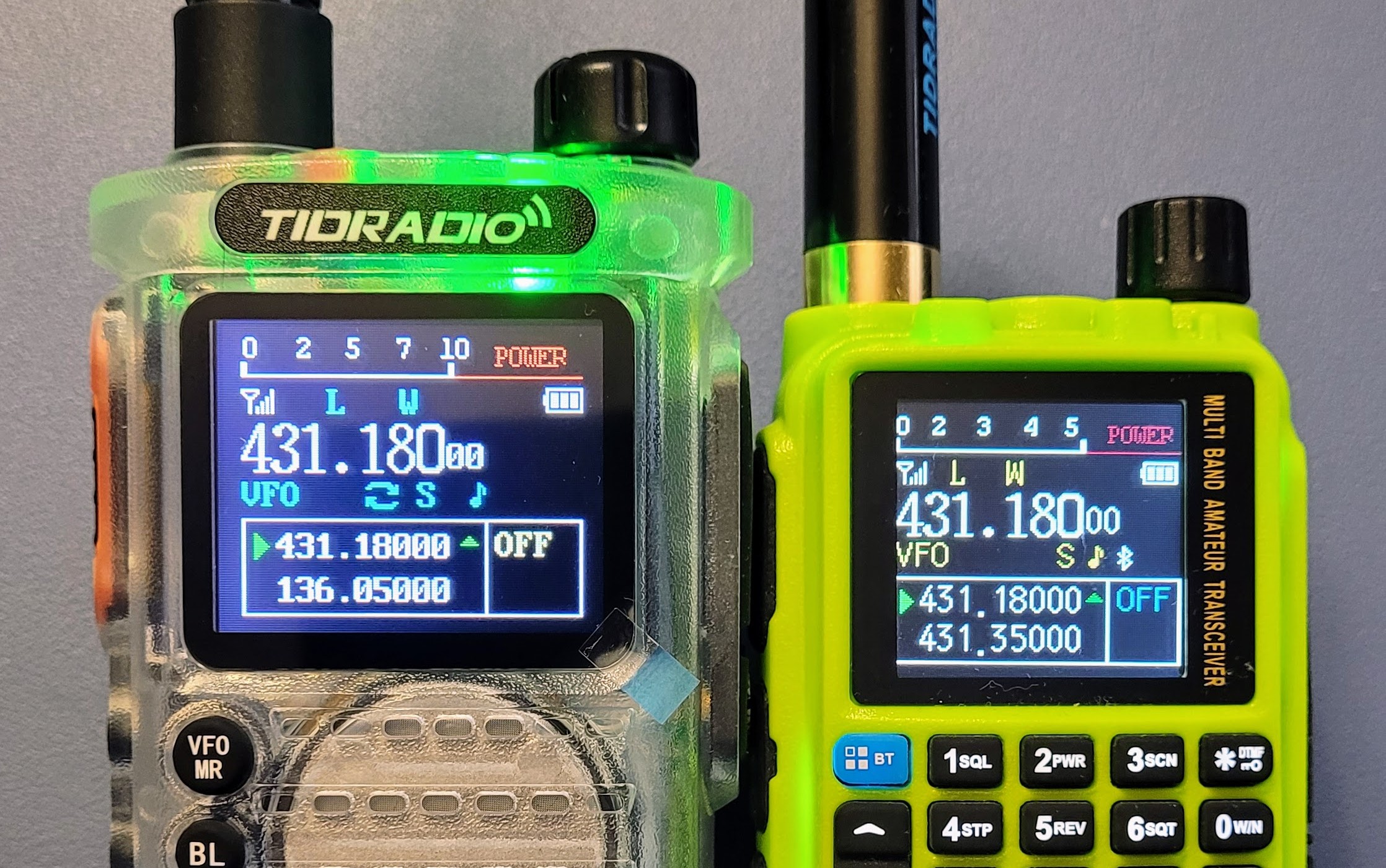
You can see the relative size difference in the photo below, with the TD-H8 on the left and the smaller TD-H3 on the right. I bought the TD-H8 in Crystal to match the TD-H3 so that the comparison would be easier to see.
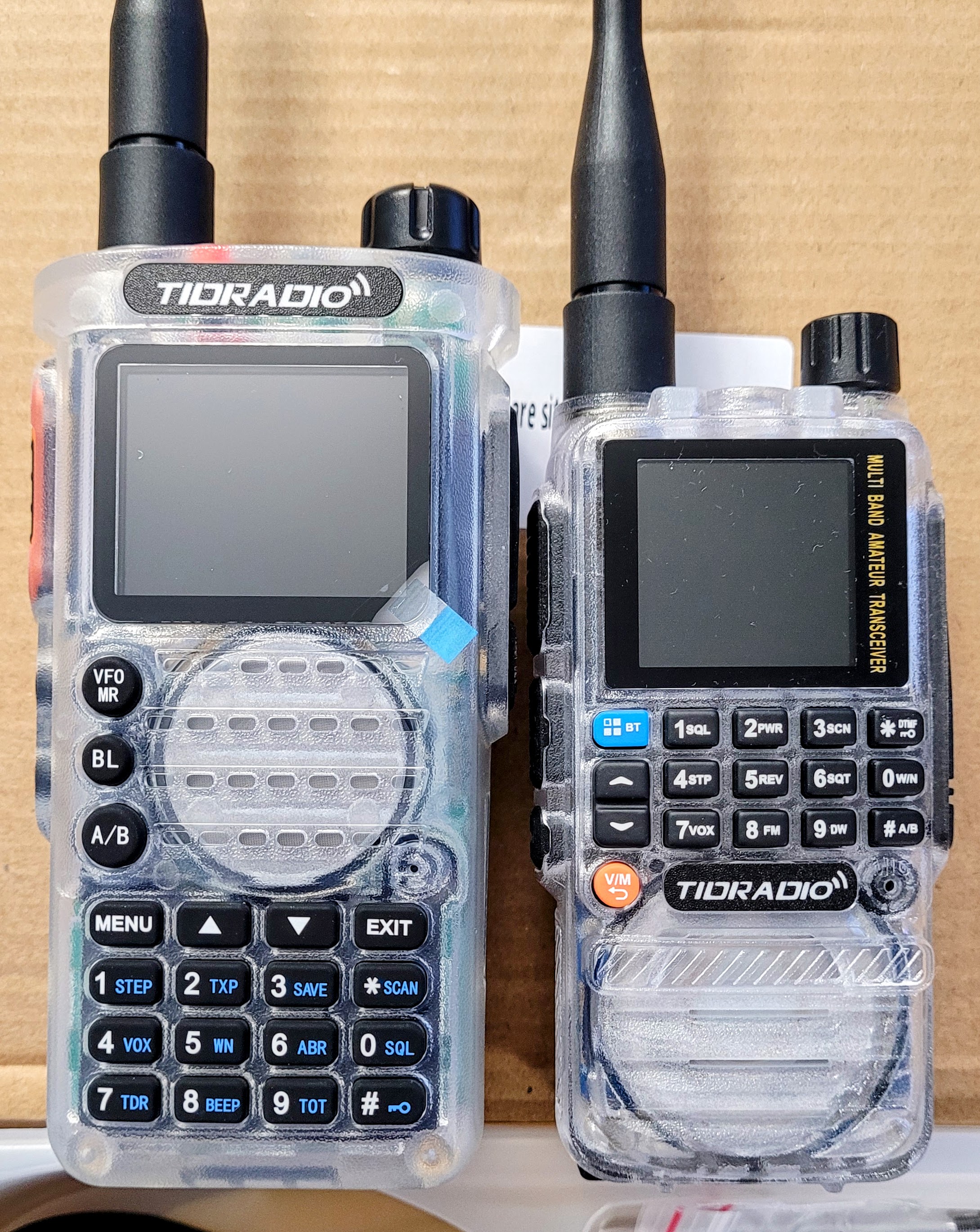
The TD-H3 HT is compact and fits nicely in my medium-sized hand. The TD-H8 is a larger HT in all dimensions. I’m surprised to find that while it doesn’t nestle into the palm of my hand like the TD-H3, the TD-H8 does fit well. The shape is comfortable and the weight makes it feel like a solid bit of kit.
You’ll notice that on the TD-H8, the volume knob is larger, the screen is larger, and the keypad buttons are larger. I find them easier to see, compared to the TD-H3.
I also like the large, clearly labeled buttons on the TD-H8 for the VFO/Memory, Bluetooth, and VFO A/B.
The display is larger on the TD-H8, and while it is not a huge difference, it is just enough to make it much easier for me to read the screen. I don’t really have trouble with the TD-H3, but the larger display on the TD-H8 makes it faster for me to zero in on what I’m trying to see.
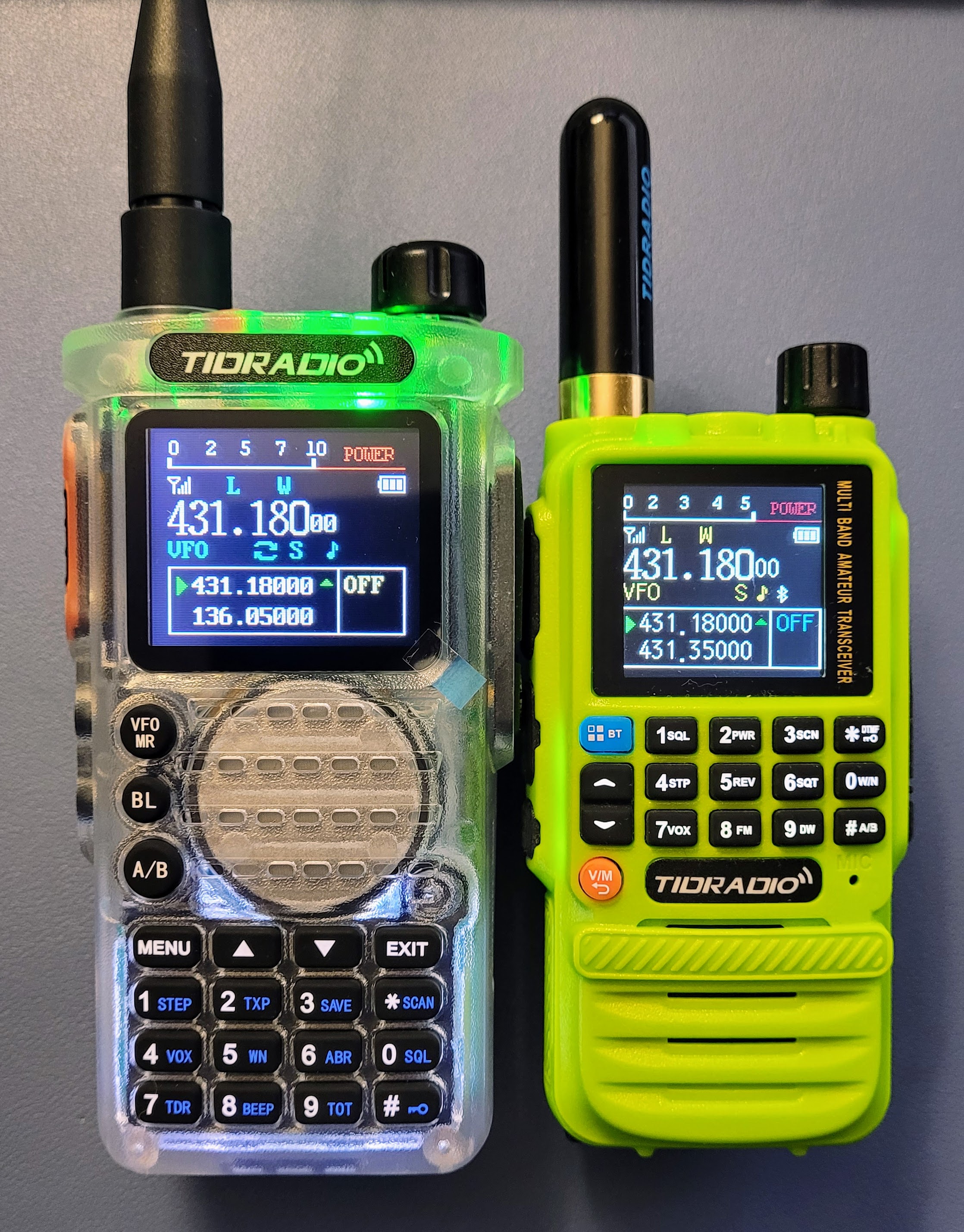
Another aspect of the TD-H8 I like is the belt clip attaches to the body of the radio, not to the battery. This means if you have multiple batteries, you don’t have to have multiple belt clips. This is different from the TD-H3 where the clip attaches to the battery. Also unlike the TD-H3, the TD-H8 package I bought included a screwdriver for attaching the belt clip.
As noted in the comments in issue 127, one of the great things about the TD-H3 radio is the ability to charge it with a USB-C charger. The TD-H8 also charges through a USB-C port. While I sit here typing and listening to AllStar node 2196 on the TD-H8, the spare battery that came in the package is charging on my USB-C phone and tablet charger. I can’t overstate the convenience of this approach.
How does it sound?
The audio quality on receive is good for the small TD-H3 and the larger TD-H8. I find the TD-H8 sounds a bit more full and pleasant, but the audio is good from both radios. The recording below is of a net on AllStar node 2196. (And as an aside, one of the great things about AllStar is the clarity of audio from stations all over the world. In the United States, an amateur with a Technician license can work the world on AllStar.) The signal is coming to my station through my AllScan ANH100 node 578493, transmitting to the two TIDRADIO handhelds. The audio was recorded into my Android smartphone in MP3 format. I did not manipulate this sound file at all.
Which radio is better?
I can’t judge which radio is better. Each has its place. I find the TD-H3 is more comfortable in my hand and it’s easier to slip it into a pocket, especially with the accessory stubby antenna I added. The TD-H8 sounds a bit better and if my hands were larger, it would be the obvious choice. Even though it is larger, it is still pretty comfortable to hold.
I prefer the more compact size of the TD-H3 but I like the display and the buttons on the TD-H8 much better. Of the two, I think that unless I need the lighter, more compact TD-H3 radio, I’ll be reaching for the TD-H8 most of the time.
Conclusion: capable and not expensive
The package I bought had a 25% off coupon, making this a very affordable acquisition:
You get an awful lot for not much money with this radio. My last comment on the TD-H3 and TD-H8 radios is simply this: when I’m going outside with a radio, I’m always thinking about whether I’ll damage it. My expensive Yaesu FT-5DR tends to stay in the house because I don’t want to break it. But these TIDRADIO handhelds are cheap enough that I worry much less about them, and because of that, I find I am carrying one with me far more often than I carry my Yaesu handhelds. And if I break one? I could buy several more for the price of a single Yaesu radio!

RF returning to the shack
Recently, while listening over AllStar to my radio friends 135 miles away talking, I heard stories of RF being reflected back to the operating station and how it was turning on a fireplace. This reminded me of the time I had a problem with RF returning to the shack.
I was participating in a net on 10 meters from my station out in the garage. The radio was a Kenwood TS-520S, with the signal going out over coax to a homebrew off-center fed (junior size) raised up on an old sailboat mast. I knew I had a lot of loss but I was a new ham and I could engage in QSOs, so I was okay with how it was working.
However, my daughter had a touch lamp in her room, the kind where you just touch the body of the lamp to turn the light on or off. Every time I would transmit, it would trigger the lamp. Of course, I couldn’t see this because I was in a different part of the house, but I always knew it was happening because I could hear my daughter through the wall, shouting: “Mom, Dad’s on the radio again!”
Eventually, I added a coiled coax choke and that calmed down the RF being reflected back to the station.

AR Newsline added to my local node
I added Amateur Radio Newsline to one of my local AllStar nodes as an experiment. I have it working with a DTMF code. I did find that I needed to extend the timeout setting on the node which was set to timeout at three minutes. Since there is no radio involved with this particular node, I extended the timeout in /etc/asterisk/rpt.conf to 30 minutes.
I find the audio quality is perfectly fine over my SIP phone. Here’s a brief audio capture to demonstrate the clean audio. The audio is coming from the speaker on the SIP phone, captured by my Android smartphone. No manipulation or editing of the audio file was done.
Now, in addition to connecting to AllStar node 516229 to listen to the ARRL Audio News when I have a few minutes, I can listen to the Amateur Radio Newsline on my own system at my convenience.

My chargers frequently go walkabout
I don’t know why, but my handie talkie chargers seem to go missing just when I need them. I don’t understand it. It’s like they grow legs and walk away.
Long story short, I bought another charger for my Yaesu FT-3DR and FT-5DR radios.
This time, I bought a cheap, off-brand charger because I know I’m going to lose it, too. However, it works, and didn’t cost much. It is charging my FT-5DR now so that I can use it with my hotspot that I use just for Yaesu System Fusion.
Someday, I’m going to find all those missing chargers. I picture them hiding in a dark corner under some furniture. I’m sure I’ll be surprised when I do finally uncover the hidden hoard of chargers.

Inovato Quadra HamClock upgrade problems
If you have an original Inovato Quadra HamClock, the vendor advises that you not run apt update and apt upgrade at this time. (I bought mine in January 2024). He writes in the Quadra forum:
IMPORTANT FOR ORIGINAL QUADRA: The latest kernel Armbian will install with apt breaks WiFi. DO NOT DO A ‘SUDO APT UPDATE && SUDO APT UPGRADE’ without holding the kernel package. To do this, open a terminal window and type:
sudo apt-mark hold linux-image-current-sunxi64
Then verify it is held with:
apt-mark showhold
I didn’t seen that before I did the update/upgrade dance. Fortunately, my wifi did not break, but I did see an error that I have not been able to resolve:
dpkg-deb: error: archive '/var/cache/apt/archives/box64_0.3.5+20250420.e7113b2-1_arm64.deb' uses unknown compression for member 'control.tar.zst', giving up
dpkg: error processing archive /var/cache/apt/archives/box64_0.3.5+20250420.e7113b2-1_arm64.deb (--unpack):
 dpkg-deb --control subprocess returned error exit status 2
Errors were encountered while processing:
 /var/cache/apt/archives/box64_0.3.5+20250420.e7113b2-1_arm64.deb
Thinking that the system was simply missing the zstd package, I installed it (apt install zstd) and tried to update/upgrade again, but I still get the same error.
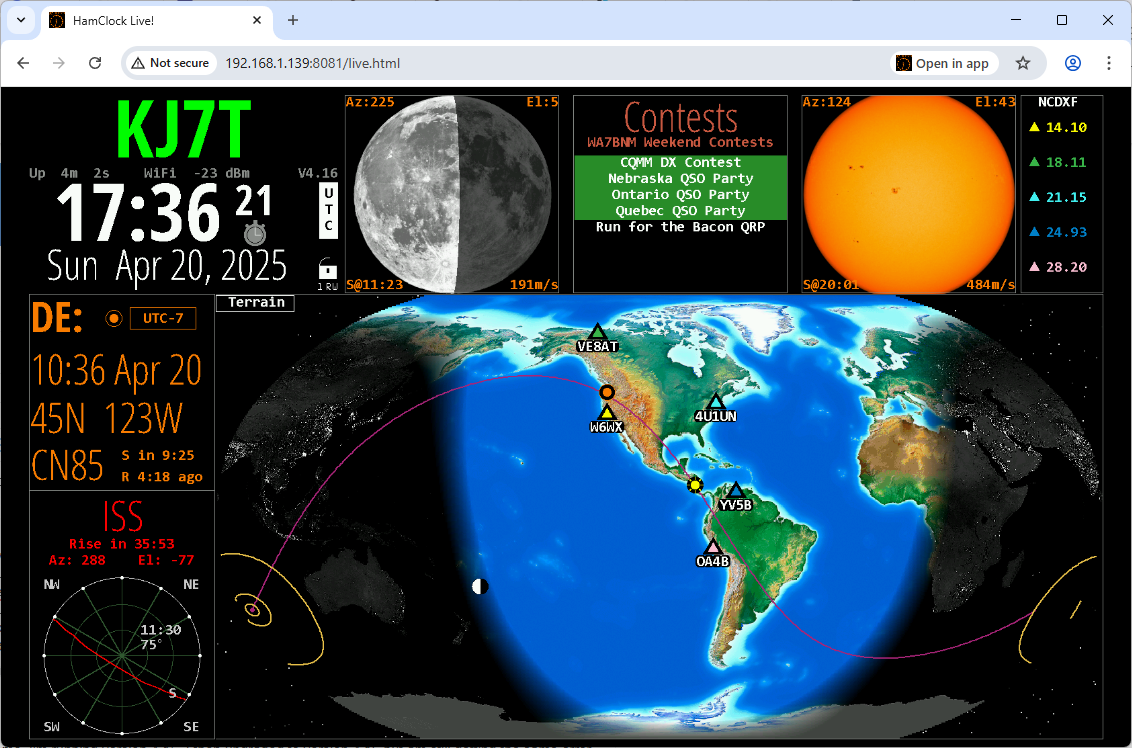
I filed a report in the Quadra support forum. Meanwhile, my HamClock appears to be running fine. This screenshot is after trying to upgrade and then rebooting the system:
By the way, Inovato is selling and shipping new Quadra units that work with 4K displays. If you have an older Quadra, you can upgrade for less than buying a new, complete system.
Disclosure: I just ordered a new Quadra 4K because it has more memory and storage, so I’m guessing it will run perceptibly smoother than the original Quadra! At $59 complete, this is an incredible value. The Quadra 4K includes other ham radio software such as WSJT-X and FLDIGI, plus an installer for more.

Help me with voicemail on AllStar?
I’d like to experiment with voicemail on one of my AllStar nodes. Who has done this? I know I can enable voicemail in Asterisk but I’m not seeing how someone would leave a message, nor how I would retrieve a message. I like the idea of voicemail as then I could designate one of my many nodes as my primary node for people to call.
I see suggestive hints in the configuration examples at https://wiki.allstarlink.org/wiki/AllStar_SIP_Phone_Configuration but it doesn’t quite fall into place for me yet. Hamshack Hotline has voice mail. Hams Over IP has it, and so does Amateur Wire. I’d like to figure this out. If you have done this, or have some ideas about it, please reach out.

Suddenly, my router was not the master
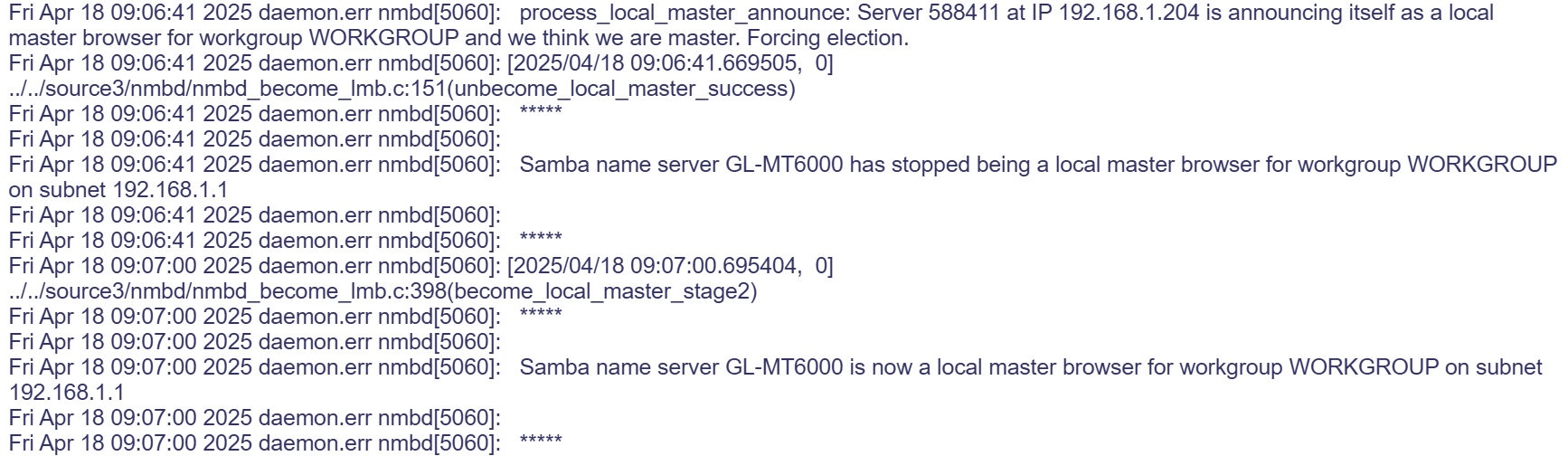
A few days ago, I had an interesting moment with my router. It just wasn’t resolving quite the way I thought it should be so I looked at the router logs. In doing so, I discovered that one of my AllStar nodes was running Samba and that node was becoming the master browser on my local area network. Odd.
I logged into the AllStar node and found the config file at /etc/samba/smb.conf. In that file, in the [global] section, I added:
[global]
domain master = no
local master = no
preferred master = no
os level = 0
The I restarted the Samba service:
sudo service restart smbdAnd just like that, the router was once again the master.

Reminder: Zero Retries Digital Conference

The first ever Zero Retries Digital Conference is coming in September!
According to Zero Retries:
We are pleased to announce that the first Zero Retries Digital Conference will be held in Everett, Washington, USA on Saturday, September 13, 2025. The Zero Retries Digital Conference (ZRDC) is being hosted by the Zero Retries newsletter.
ZRDC 2025 will be held in the same venue as the GNU Radio Conference 2025 – the Edward D. Hansen Conference Center in downtown Everett. (GRCon 2025 will be held the week immediately prior to ZRDC 2025 – Monday September 8th through Friday, September 12th, 2025.)
While GRCon 2025 will have some coverage of Amateur Radio, including VE testing, the Zero Retries Digital Conference will be 100% Amateur Radio content.
The presentations at ZRDC 2025 will be “leading edge” topics such as are typically discussed in Zero Retries. We hope to have some very exciting presentations, demonstrations, and new technology discussed and revealed at ZRDC 2025.
Review the announcement for more information. I hope to see you there!

Ham radio, flying, and geology!
I commend to you this 31-minute YouTube for anyone interested in aeronautical amateur radio and Pacific Northwest volcanoes. Ride along from takeoff to landing as the pilot and amateur radio operator flies over Mount St. Helens. This is not an old video — the pilot recorded it on April 13, 2025.
A month before Mount St. Helens erupted in 1980, I started my first full-time geology job at a gold mine in Battle Mountain, Nevada. My spouse was upwind from the eruption in Shelton, Washington when the mountain popped. This eruption figured prominently in our lives at that time, and has continued to be a “marker moment” in the lives of many people in the Pacific Northwest.
Bill Knaust W7NY combines amateur radio and flying as he talks his way through a fly-over of Mount St. Helens and the surrounding countryside. Bill’s video and commentary provide a rich experience for viewers. From the camera mounted on his Piper Cherokee aircraft, you’ll see the snow-covered lava dome in the center of the crater with some steam in the crater.
Just after takeoff, Bill flies over the Tacoma Narrows Bridge. It is actually two bridges. I sailed under the bridges while the new one was being constructed. Here’s a view from the boat showing the old bridge and active construction on the new bridge, from the cockpit of my old West Wight Potter sailboat.

After the first pass over the crater, Bill makes a left turn that reveals Mount Adams and Mt. Rainier in the distance. These are stunning views of our volcanoes that most people don’t get to see in this way. I also appreciated seeing him set up for his landing because he flew right over the highway that carries me between Portland, Oregon and Olympia, Washington, alongside the mighty Columbia River.
I live in the Pacific Northwest because I love our mountainous landscapes. I’ve hiked much of Olympic National Park and some of the Pacific Crest Trail in Washington State. The views Bill captured are stunning and provide superb views of some of our highly varied landforms in the PNW.
Bill has shared some other great flight recordings in his YouTube channel. I’ve heard him on 146.52 MHz while he was flying and I was driving. I think you’ll find some of his YouTube videos as fascinating as I have.
A special shout out to Amateur Radio Weekly for sharing Bill’s great video!

This just in
DVRef will be the registry of reference for Yaesu System Fusion reflectors effective June 1, 2025. If you use Pi-Star or WPSD hotspots, you’ll likely need to update on or after June 1st to get the new list. If you operate a reflector, DVRef encourages you to add your reflector(s) to the DVRef portal as soon as possible.
OpenWrt One router officially launched, says https://openwrt.org/. This was announced on November 29, 2024 and I just became aware of it. “Unbrickable,” says OpenWrt. Available from AliExpress for $88.80 as a bundle with a case, 3 antennae, and a US power supply. The router gets 4.9 starts from 70 ratings. (Thank you to Steve K9ZW for publishing a note about the OpenWrt One router in his With Varying Frequency blog.)
If you happen to own a M1KE device by SharkRF, the latest firmware update (v26) includes support for AllStarLink and IAX.
I purchased an old Cobalt Qube 3 all-in-one server. I configured and maintained several Sun Cobalt RaQ and Qube 3 servers in the early 2000s. Thinking it might be fun to resurrect one of these old devices, I located one in great cosmetic condition on eBay. It should arrive around the beginning of May. Fingers crossed that it boots up and has no unrepairable faults! If it is toast, perhaps I can turn it into a custom network attached storage box. I believe a mini-ITX motherboard will fit inside, so if the unit is dead, the options are good for a fun restomod project.
73 to all and remember to touch a radio every day!



Leave a Reply