
What radio for a long trip? New podcast mic setup. New ASL interface underway. ASL “restomod” project. XHDATA D-220 radio reviewed. Google Groups alternative. Zero Retries newsletter is recommended!
.-. .- -. -.. — — / .– .. .-. . / .-. . …- .. . .– / -… -.– / -.- .— –… –
Topics in Issue 105
1. What Radio(s) for Upcoming Road Trip?
2. Podcast Recording Combination
3. News: A New ASL Audio Interface Under Development by NR9V
4. Project: ASL/PC-1A “Restomod” Project Wiring
4.1 Parts box
4.2 Wiring
4.2.1 Masters Communications RL-20 DB9 pins
4.2.2 Microphone jack
4.2.3 Audio amplifiers
4.2.4 Capacitors
5. Review: XHDATA D-220 AM/FM/SW Radio
6. Alternative to Groups.io and Google Groups
7. Interesting Stuff: Zero Retries Newsletter
8. Grab Bag
8.1 Allstarlink Notify (ASLNotify)
8.2 Allstar Neo II
8.3 Asteroid mining? Really?
8.4 I flipped for this pocket knife
8.5 Wirecutter recommends walkie talkies
8.6 Wedding anniversary
9. Audio: Random Wire Reflections Podcast
.-. .- -. -.. — — / .– .. .-. . / .-. . …- .. . .– / -… -.– / -.- .— –… –
1. What Radio(s) for Upcoming Road Trip?
I’ve got a long road trip coming up at the end of September: Portland, Oregon to Wichita, Kansas. Currently installed in the pickup truck is a Yaesu FTM-300DR transceiver with a Comet SS680SB antenna attached to the roof rack. This is a 1/2-wave antenna for 2 meters and 5/8-wave on 70 centimeters. This combination has worked well for me. I hope to have enough time on the return trip to Visit Santa Fe, NM or Moab, UT again.

Mounting an antenna on my Honda Ridgeline is a challenge. I don’t want to punch a hole in the roof. A mag-mount antenna would be okay but I know I’ll hit some very windy spots while driving, so a mag-mount is not preferred. I think the most likely would be a modified stake mount of some kind, with the mounting plate slipping underneath the tonneau cover that covers the truck bed…except unlike other light trucks, the Ridgeline doesn’t have stake pockets! I may have to use a carrier bar mount like I do with the Comet antenna.
I see there are several C4FM repeaters between Portland and Wichita, and since I like C4FM, I plan to use the FTM-300DR for this trip. (I’ll certainly need to add the Colorado Digital C4FM repeaters to the FMT-300DR.) I also run APRS while I travel.
My question is: what other radios/bands should I consider taking with me?
Eventually, I do want to move into DMR mobile radio but I have so much piled up on my “to do” list that I don’t think I can give a new DMR radio the attention it needs before the trip.
I like 6 meters but there are not as many 6-meter repeaters as there used to be. I’d consider adding a 6-meter rig for the trip. I do have a Yaesu FT-891 transceiver and would consider taking that to work 6 meters and some HF. I would like to mount an HF antenna on the truck and would prefer that it be adjustable while driving (i.e., an antenna for mobile use, not just portable use).
Potential HF mobile antenna options include:
I’m intrigued by the GRA-750B antenna, even with the “interesting” comments about it on the Amazon listing. I’m not a big fan of putting a screwdriver antenna out in the weather, year-round (it rains a lot in Portland!). The GRA-750B has no moving parts and requires a tuner. The manufacturer rates it for up to 120 watts on SSB and 40 watts on FM. It looks like it would fit on a stake hole antenna mount. You know, it might make an acceptable POTA antenna on a strong mag-mount or a tripod. Hmmm…
For a POTA antenna that I could mount on a tripod or on a hitch adapter on the truck, I’m liking a less-than-full-size delta loop antenna, the EAntenna HF Rotatable Antennas 17826.11B. Similarly, I’ve often wondered if I could build a poor man’s delta loop with a couple of 17-foot telescoping aerials with a wire clipped to the top of each aerial!
.-. .- -. -.. — — / .– .. .-. . / .-. . …- .. . .– / -… -.– / -.- .— –… –
2. Podcast Recording Combination
For the last several Random Wire Reflections podcasts, I’ve recorded audio using a Behringer C-1 condenser microphone running through a Behringer MIC500USB pre-amplifier. This week, I’m using an Audio-Technica AT2005USB dynamic microphone through the MIC500USB pre-amp. The AT2005USB also has an XLR connector and I’m using an XLR line to move sound from the mic to the pre-amp. The pre-amp has a USB out so that’s how audio gets to Audacity. I save the sound file as a project and edit audio in Audacity.
The AT2005USB has a cardiod pattern that does reject more background sounds than the C-1 condenser mic, at least when the sound is behind the mic. I think the sound with the AT2005USB mic through the pre-amp is just a little bit cleaner than I was getting with the C-1 mic.
I tested the sound and posted the results on the Random Wire:
As long as I’m talking microphones and associated bits, I purchased a new microphone arm for my recording studio, aka my desk. The FIFINE Microphone Boom Arm, Low Profile Adjustable Stick Microphone Arm Stand with Desk Mount Clamp, Screw Adapter, Cable Management, for Podcast Streaming Gaming Studio-BM88* swings out of the way, giving me a bit more room on my small sit-stand desktop surface.
.-. .- -. -.. — — / .– .. .-. . / .-. . …- .. . .– / -… -.– / -.- .— –… –
3. News: A New ASL Audio Interface Under Development by NR9V
David Gleason NR9V is creating a new audio interface board on a single PCB, called the UCI120 USB Communications Interface. This device will be suitable for use as an audio interface for an AllStarLink node. I am really excited about David’s project! His board will greatly reduce the time and frustration in building your own high-quality AllStarLink node. Impressive work by NR9V!
Find his software for AllStarLink nodes at https://allscan.info. When the UCI120 becomes available, I assume that’s where he will also publish product information. In the meantime, David is keeping interested folks informed via his Facebook group at https://www.facebook.com/groups/allscan.
About the UCI120, David writes:
The AGC/dynamics section will have a switch supporting 3 attack/release timing settings, a bypass switch enabling external mic-preamps/channel-strips/line ins to be used, a switch to support electret (e.g. headset) mics, and a jumper to bypass the low-cut filter, as well as to the mic gain adjust knob and 0/10/20dB mic boost switch. With these options the UCI120 will support pretty much every type of mic and line input, while also supporting many other applications e.g. recording, podcasting, remote rig control, and use as a standard PC USB audio interface.
Considering that the UCI120 “will also be available as the PCB only without enclosure so it can be used in comms speakers, phone patches, etc.” I’m tempted to delay my Kenwood PC-1A audio interface project! Since I already have my parts on hand, and because I want to extend my learning, I’ll carry on with the PC-1A build. However, when David’s UCI120 comes out, I’ll be one of the first in line to try it!
.-. .- -. -.. — — / .– .. .-. . / .-. . …- .. . .– / -… -.– / -.- .— –… –
4. Project: ASL/PC-1A “Restomod” Project Wiring
I needed a shorter name for this project so it is now the PC1ASL.
Previous project links include:
Preparing for an AllStarLink Build (Random Wire Review 101)
AllStarLink Build Progress (Random Wire Review 102)
AllStarLink Audio Interface “Restomod” (Random Wire Review 103)
ASL: Restomod of PC-1A Phone Patch Controller (Random Wire Review 104)
4.1 Parts box
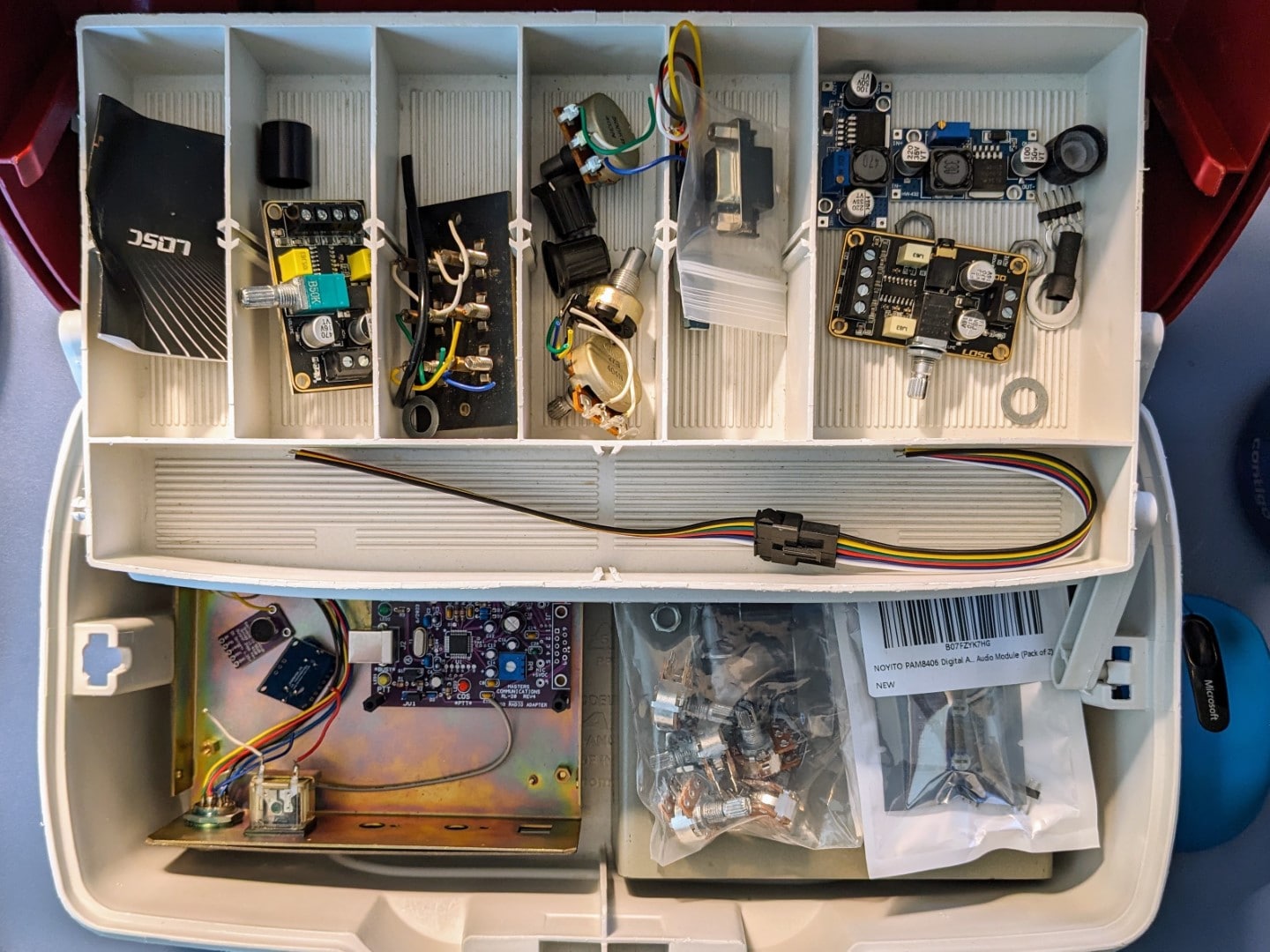
My project parts box is not at all fancy — it’s a Plano tackle box that I picked up at a thrift store for a couple of bucks! I find it helps to keep the little bits and pieces together as I work on a project over several weeks.
4.2 Wiring
Below, I describe my thinking on how to connect the components together. I don’t have a good circuit design program so if a drawing shows up here, I probably did it on the back of an envelope in pencil, with lots of erasures! If there is no drawing, well, that means the pieces are still trying to come together in my mind.
This project revolves around the Masters Communications RL-20 audio board:

4.2.1 Masters Communications RL-20 DB9 pins
The following pinout description comes from Masters Communications for the DB9 pins on the board. (I think the proper term for this is a DE9. “The DE-9 D-sub 9-pin connector is often mistakenly referred to as the ‘DB-9’ connector,” says NullModem.com. However, since I’ve always heard it called a DB9, that’s what I’m going with.)
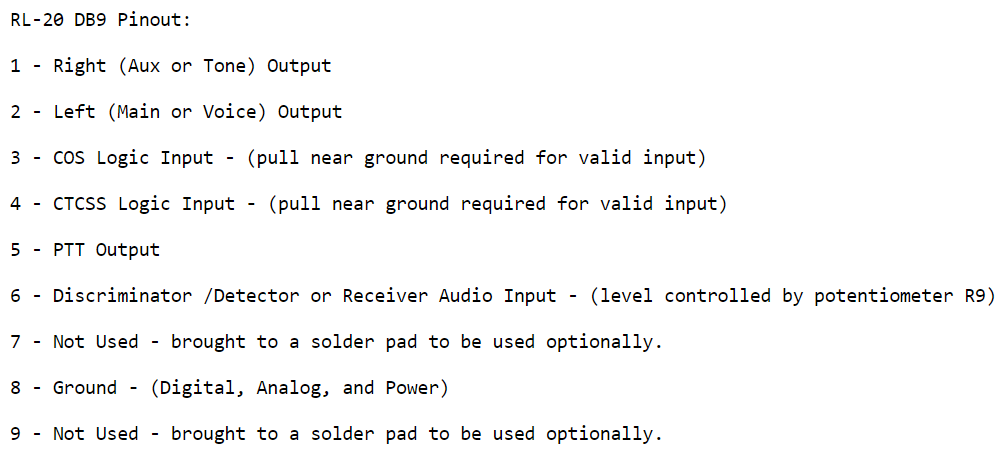
For the PC1ASL project, here are the pin numbers and connections I think is correct:
not used (it would be for right-channel audio but I am only using the left-channel)
Audio out (left channel) to 5KΩ potentiometer center
COS to microphone jack PTT pin 2
not used
not used
Audio input from MAX9814 audio amplifier (level controlled by 5KΩ potentiometer)
not used
Ground
not used
4.2.2 Microphone jack
For the microphone jack wiring, I pulled information from the great allscan.info instructions for building your own AllStarLink node.

Pin number and connection:
Microphone audio through a 5KΩ potentiometer to MAX9814 to RL-20 DB9 pin 6
PTT to RL-20 DB9 pin 3
not used
not used
+5VDC in from the RL-20 MIC +5VDC pad
not used
Microphone ground to RL-20 DB9 pin 8
Ground to RL-20 DB9 pin 8
4.2.3 Audio amplifiers

The PAM3806 audio amplifier is used for volume out to a mono earphone/headphone or external speaker.
Audio from RL-20 DB9 pin 2 is fed to the PAM3806 amplifier.
Audio from the PAM3806 (left channel only) goes through a 5K potentiometer to a 1/8” TRS stereo jack on the back of the PC-1A case.
The MAX9814 amplifier is used to condition audio (AGC) and control audio gain (volume in) being fed to the RL-20 board.
Microphone audio comes in through a 5K potentiometer to MAX9814 to RL-20 DB9 pin 6
4.2.4 Capacitors
Am I going to need capacitors? I think I’ll need to use at least one. The Alinco EMS-57 hand microphone can sound harsh when unkeying the mic. A capacitor between MIC pin 5 and MIC pin 8 might soften that hard-sounding attack.
.-. .- -. -.. — — / .– .. .-. . / .-. . …- .. . .– / -… -.– / -.- .— –… –
5. Review: XHDATA D-220 AM/FM/SW Radio
This week I took a closer look at a radio sent to me for review. The XHDATA D-220 radio is a shirt-pocket-friendly lightweight radio for casual listening. Lack of contrast on the tuning dial may make it more difficult for some people to use. This is a separate article on the Random Wire site.
.-. .- -. -.. — — / .– .. .-. . / .-. . …- .. . .– / -… -.– / -.- .— –… –
6. Alternative to Groups.io and Google Groups
My high school senior class incorporated as a 501c7 nonprofit social club to help maintain knowledge about reunion planning and to protect the people handling funds for the class. We needed a simple way to communicate that hid email addresses but allowed a classmate to reach out to another classmate. We found a good solution in Gaggle Mail.
The free version of this email list service allows up to 1,000 subscribers. Multiple people can serve as administrators and an incognito mode protects email addresses. The interface is relatively modern and attractive.
Simple and Modern Listserv Replacement. Hosted entirely in the cloud, Gaggle Mail allows you to create, set up and run group email discussion lists with ease. Whether you’re a casual group of 10 or a professional organization of 10,000 — Gaggle Mail has you covered.
I did look at Google Groups and Groups.io but both of those services have some drawbacks. Both are a bit confusing to configure and administer. As my classmates continue to get older, simpler approaches are usually better choices. The free version of Groups.io is limited to 100 subscribers; with several hundred classmates, 100 was not sufficient.
.-. .- -. -.. — — / .– .. .-. . / .-. . …- .. . .– / -… -.– / -.- .— –… –
7. Interesting Stuff: Zero Retries Newsletter
Random Wire℠ subscribers know I’m a fan of Steve Stroh’s excellent Zero Retries newsletter. His issue 0166 is chock-a-block full of great stuff. The items I liked the most include:
But there is much, much more to the Zero Retries newsletter. I always find something of interest in Steve’s content. Subscribing is Random Wire Recommended!
.-. .- -. -.. — — / .– .. .-. . / .-. . …- .. . .– / -… -.– / -.- .— –… –
8. Grab Bag
8.1 Allstarlink Notify (ASLNotify)
I’m not sure how I missed this, but I definitely want to install it on my node-in-the-cloud 57945 (https://kj7t.net).
Per the GitHub page for the ASLNotify project:
ASL has a built-in ability to run a script on the connection or disconnection of one node to another node. Many node owners use this functionality as a notification method to know when someone connects/disconnects to their system. This is done via either email or text message, depending on how the owner has the script set up.
I envision setting this up with Pushover to get real-time messages sent to my Android phone. This sounds ideal for monitoring a remote node I rarely use!
UPDATE: To install ASLNotify, one must install python3 and phyton3-pip. No problem there as these are already present in my Vultr.com instance. However, the install routine failed when I ran pip3 install -r requirements.txt. Apparently, pip3 is running outside of my Vultr.com space and I don’t have administrator control over it. I may reach out to the Vultr support folks to see if there is a workaround.
8.2 Allstar Neo II
On eBay is a great looking all-in-one node shipping from the United Kingdom: Allstar Neo II Allstarlink node use with Hubnet, Echolink and other networks
This device is based on a Raspberry Pi 4 single-board computer running HamVoIP in an Argon Neo aluminum case. If you were looking for an elegant looking setup, this checks that box. One of the great features of this build is the safe shutdown button on the case.
Here’s the description from the eBay listing (I corrected some grammar):
Compact Asterisk “Neo II” UHF portable low power (mW) Asterisk node. Suitable for connection to Hubnet, Echolink and many other systems on the Allstar networks. It’s a very good reason to dig out your old UHF FM radio and give it a new lease of life. Using a Pi-4B SBC, it comes mounted in an Argon Neo Aluminium case. This gives a very strong and durable enclosure which is very easy to dismantle and replace if damaged. Also, a front mounted safe shutdown button and a external UHF SMA female antenna connector, TX, RX, 5V power and LAN activity LEDs are all visible externally on the case. The DAC CM119A modified sound-card is hard wired which prevents any future whining due to contact oxidization. You can run it with either a direct hard wired RG45 LAN cable connection, or on the in-built Wi-Fi connection. The node is fully tested and runs with Hamvoip RPI2-3 Hamvoip V1.7.1-04. and can be controlled with transmitted DTMF commands, or with Allmon2, Supermon, Supermon2 and Allscan v0.78 HTML dashboards. Setup also includes for the use of the admin dashboard via SSH direct access. Along with both Node remote and DVSwitch mobile IAX2 android apps. The unit requires a suitable quality PI4 rated 5V 2.5A DC type C USB power supply. or a suitably rated power bank (both not supplied).
The approximately $211 price plus about $36 shipping seems pretty reasonable for such a spiffy looking node.
8.3 Asteroid mining? Really?
My geologic spidey sense was triggered when I read this title: Against all odds, an asteroid mining company appears to be making headway
Not to dwell on an obvious pun, but this sounds like an incredibly risky shot in the dark. I’ll be following the topic of asteroid mining because, well, it is just so bizarre!
8.4 I flipped for this pocket knife
My new pocket knife instantly became my favorite everyday carry knife. I picked up a Ben Petersen Sendy Liner Lock Flipper Knife by CIVIVI from KnifeCenter.com. Amazon has a CIVIVI page with several variations of the Sendy knife.

The blade is Nitro-V steel and 2.83” long. I’m a big fan of good micarta knife scales; the handle of this knife is an understated, relatively smooth, green canvas micarta. The Sendy has a deep-carry pocket clip and the knife action is silky smooth. Bonus points for the metal tweezers and toothpick hidden in the handle.
I find the Nitro-V blade easy to resharpen with a ceramic sharpener. Says CIVIVI:
Nitro-V is a type of stainless steel that is designed specifically for use in the manufacturing of high-quality knives. It is a relatively new steel, first introduced in 2017, and is rapidly gaining popularity among knife makers and enthusiasts.
A few weeks ago, while shopping in Cabela’s, I got to talking with a Cabela’s associate in the knife section. It turned out that he had just bought a CIVIVI knife, too. We swapped knives for a few minutes and checked out the two different models. He really liked the Sendy and I was glad to get it back from him!
8.5 Wirecutter recommends walkie talkies
If you happen to be in the market for walkie talkies for yourself or for family members (hint: hunting season is coming up), the New York Times recommends two models in their Wirecutter section:
Both models are license-free FRS radios. The Mountain Radio appears to be more water resistant while the X-TALKER has NOAA weather radio built in.
I like the rugged build of the Mountain Radio but I’m not sure I could stomach $220 for a pair of them. I could buy 7 pairs of the Midland radio for that amount of money!
8.6 Wedding Anniversary
This week, my spouse and I celebrated our 47th wedding anniversary. It seems a bit surreal, really. We’ve lived many places and traveled the world together, raised a family, and continue to enjoy our ever-changing life together. What an amazing journey, with more adventures sure to come.
.-. .- -. -.. — — / .– .. .-. . / .-. . …- .. . .– / -… -.– / -.- .— –… –
Audio: Random Wire Reflections Podcast
The audio version of Random Wire Review issue 105 is called Random Wire Reflections. You can find it on my podcast page and on most podcast streaming services — just search for Random Wire Reflections.
.-. .- -. -.. — — / .– .. .-. . / .-. . …- .. . .– / -… -.– / -.- .— –… –
Thank you to all subscribers. Please feel free to forward the Random Wire newsletter to others who might be interested in this content.
73,



Leave a Reply