
August 22, 2025: The featured content this week is the resurrection of my failed AllStar node 588412, replacing the mini PC with a Raspberry Pi 4.
Top of mind
Simple 2-meter antenna from coat hangers (ARRL Facebook post and a PDF file) which is not new but looks simple, effective, and might make a great club meeting project.
Not new, but still an interesting way to learn and use CW: https://hamradio.solutions/cwhotline/.
Kansas City Wide is now on Hams Over IP (details below). This is significant because many amateur radio voice-over-ip users are transitioning to Hams Over IP because Hamshack Hotline is sunsetting services on August 29th.
LinHT – a next-generation Software Defined Transceiver (and see this Facebook post, especially the explanation [which I agree with] by David Gleason NR9V on why this is such an important development).
Introducing the new CHA FSR (Faraday Strip Radial System) by Chameleon Antenna. (I would buy more Chameleon products if they weren’t so expensive!)
Connect Systems still has a few Used CS7000 M17 PLUS WITH GPS radios for $199 each. I bought one and honestly, I can’t tell it is used. It looks and operates as new.

Context
I write about my amateur radio activities and experiences. Sometimes I produce a recipe for how to do a particular thing. In the information technology space, these might be called runbooks. I call them TechNotes and they are available here.
If you’re expecting long position pieces, I’m afraid you’ll be disappointed. I do offer my thoughts on specific issues from time to time, but most of the time, I’m content to confront specific hardware and software/firmware problems.
I do think we radio amateurs sometimes dismiss old technology too easily and discount the need for new tech too quickly. I’ll close this newsletter by expanding on this particular theme.
Finally, I’m slowly developing another website that will focus more on internet-connected amateur radio for voice and data communications. I secured the domain name several months ago but have had to set much of this work aside to help care for my wife during her stroke recovery.
I’m always open to suggestions, helpful criticism, and challenging ideas.
Kansas City Wide now available on Hams Over IP
This is good news.
Posted to Facebook by Rick W0FH:
The KCWide changeover from Hamshack Hotline to Hams Over IP is complete. The new HOIP extension for KCWide is 15135. The operation is the same, *99 to transmit, # to stop.
If you bought an IP telephone for Hamshack Hotline, go to https://hamsoverip.com/wiki for instructions on getting a new extension number, and for instructions on updating the configuration of your phone.
If you have a phone connected to a different network (Amateur Wire, AREDN, MeshPhone, Global VOIP, etc.) the Wiki also has instructions for dialing between networks. EVERYTHING works together.
Why VOIP? Convenience! I sit down at the desk and touch one button, and I’m listening to KCWide! To respond to a radio call, touch *99 and the speaker phone has me talking on KCWide. If someone calls me and I’m working on something else and have the radio volume down, I can grab a direct call from them on the phone with one button. I also use the GroundWire app on my Android phone, and can make and receive calls through HOIP from anywhere.
If you’d prefer to see the HOIP wiki without their banner image, try visiting the source at https://hamsoverip.github.io/wiki/. You’ll get the same content there in a slightly simpler format.
A few weeks ago, I saw a migration guide to help people make the switch from Hamshack Hotline to Hams Over IP, but I’ve not found it again. Usually, I bookmark significant things using Raindrop.io but it appears I did not do that this time. I didn’t find it when searching for “migrate” or “migration.” I’ll keep looking, though, and share this information if and when I find it.
FEATURED: Replacing an AllStar node computer with a Raspberry Pi 4
My trust AllStar node failed (again), so I’m replacing it with a Raspberry Pi 4. The same failure has occurred twice in less than a year. It’s hardware, not software.
588412 is my desktop node
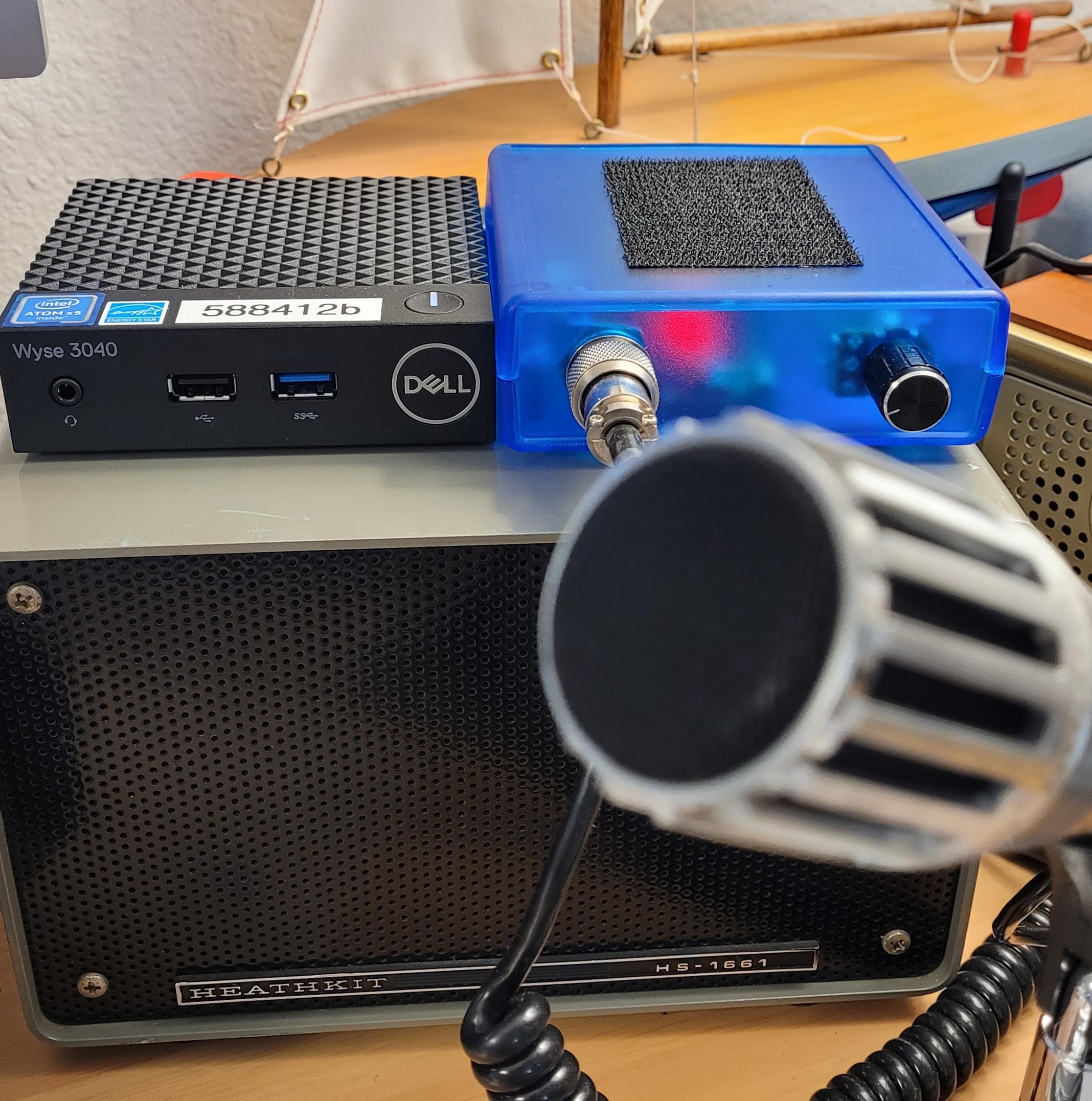
I call node 588412 my desktop node. It sits on my desk in Portland, Oregon. The components are a mix of new and old:
Beelink T5 mini PC
AllScan UCI120 microphone interface
Kenwood MC-60A desk microphone
Heathkit HS-1661 speaker
With the old Kenwood mic (and the great audio it produces), and the old Heathkit speaker, the node feels like an old radio. The Beelink mini PC and the AllScan interface are quite modern, producing a resto-mod impression when using the node. I like pushing the big button on the microphone to transmit and hearing great audio coming from that big old speaker.
Here’s an old picture of the node running on a Dell Wyse 3040 mini computer and using an early version of an AllScan audio interface.
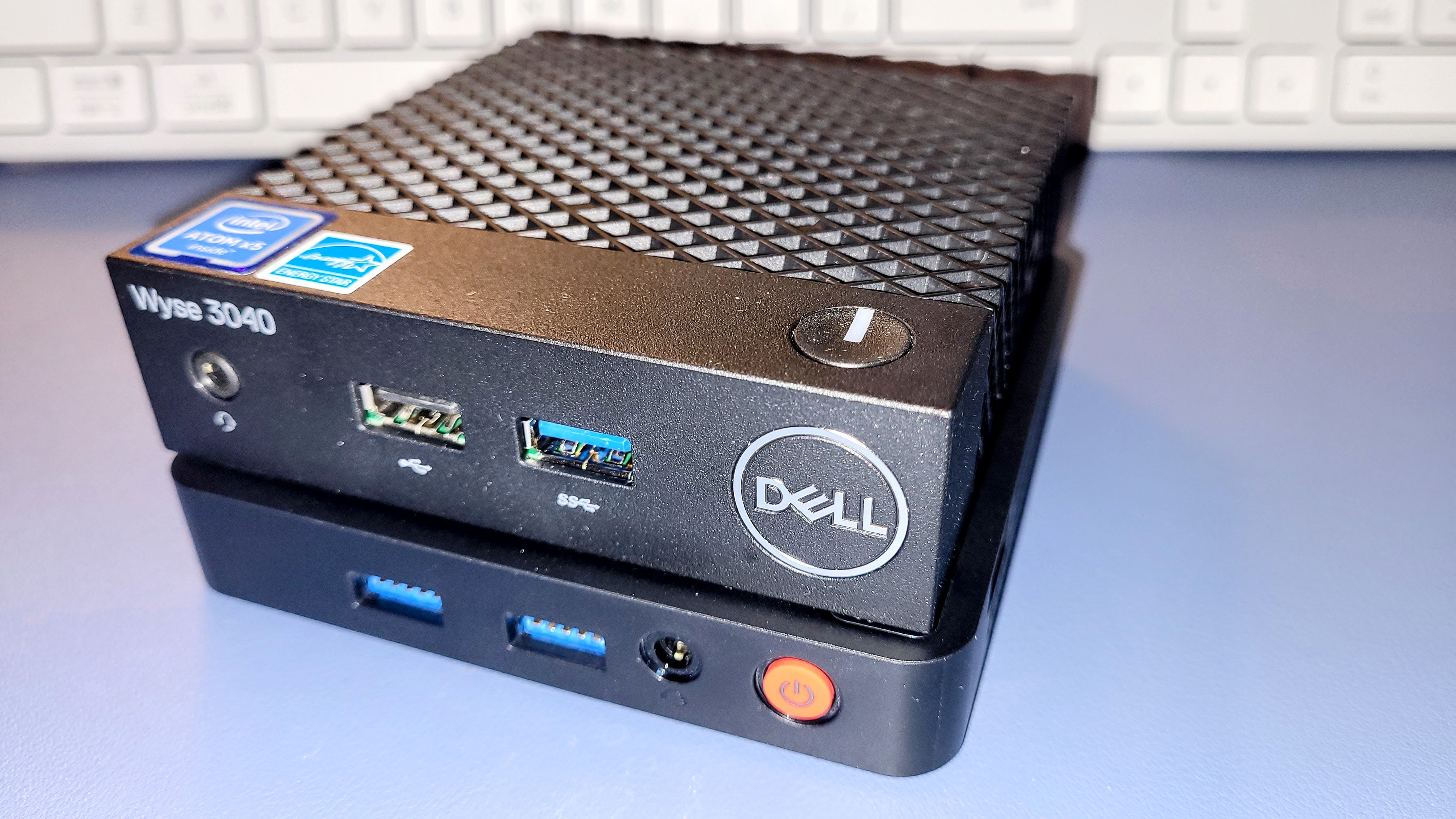
A newer version sported a Beelink T5 mini computer and a newer AllScan interface.
What failed?
The fan on the Beelink T5 started making noise last year. At that time, I opened up the case, blew the fan clean, and reassembled the computer. Problem solved.
Now it is doing it again, and the fan is intermittently stopped, resulting in overheating of the mini PC. The overheating condition is causing the node to shut down. That’s a problem because I’m working remotely much of the time.
I’m working with Beelink support on this and they have been helpful. My takeaway from this happening twice in less than a year is that the T5 may not be a good choice if you have an environment that has dust or pet hair. The tolerances are so tight on this tiny little device that a speck of dust can stop the fan.
What computer to use instead?
I could go back to the original computer I used for node 588412, a Dell Wyse 3040 thin client machine. That would work fine and it may be that I’ll return to that solution, but first I want to try the node with a Raspberry Pi 4 in an aluminum, passively cooled case (no fan!).
I chose an iUNiKER case:
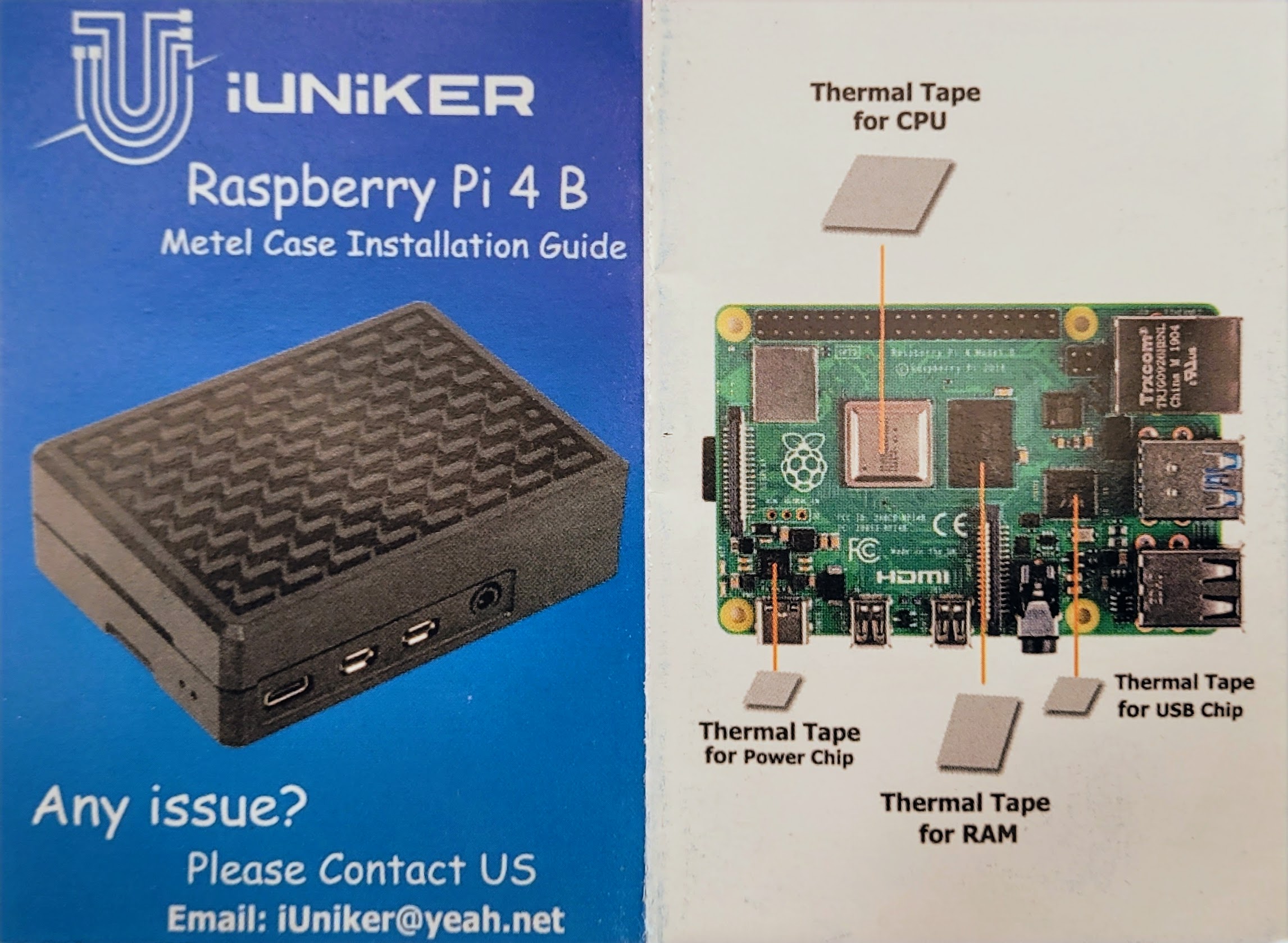
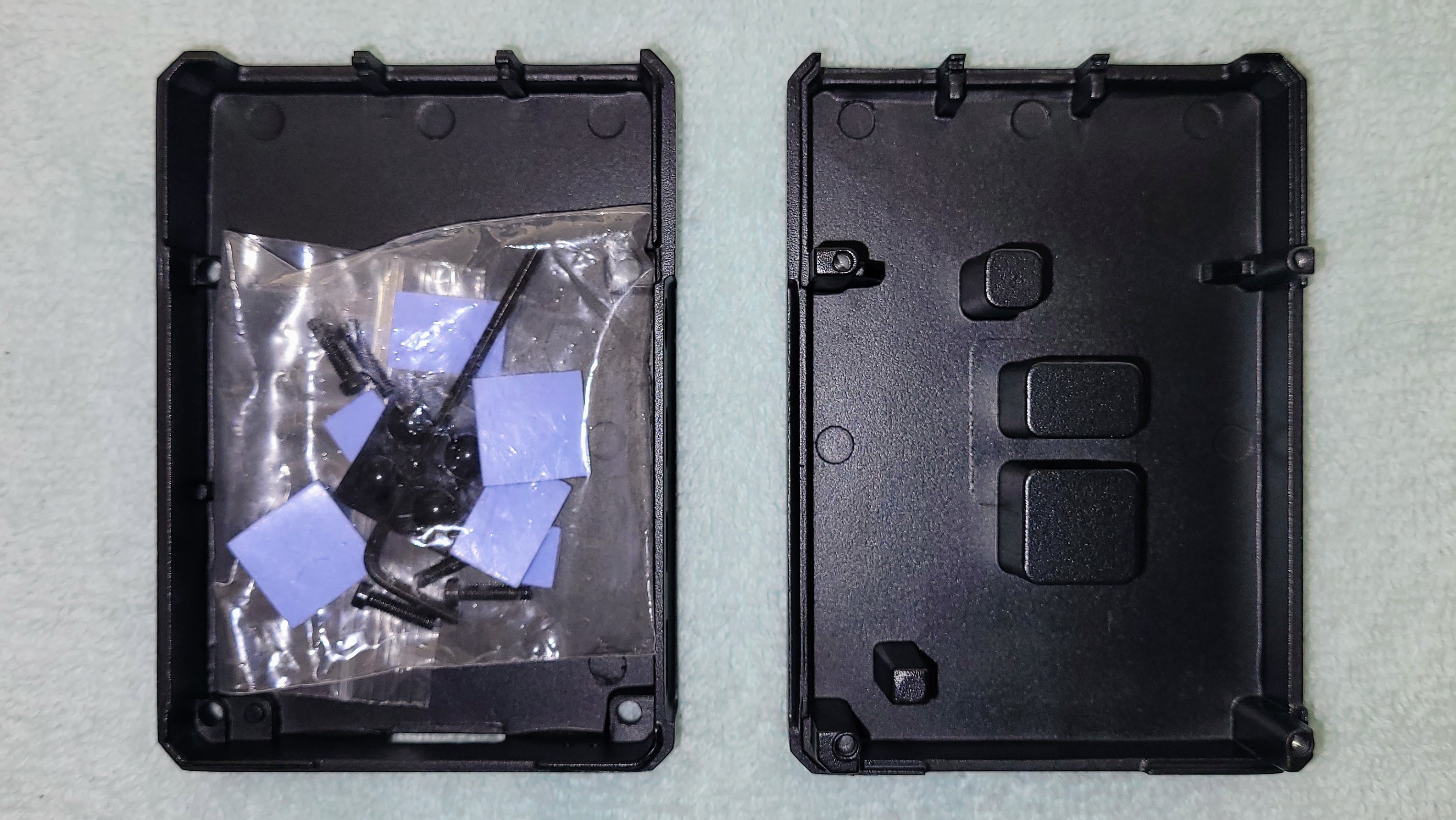
The thermal tape included in the package goes on four chips: the RPi 4 power chip, CPU, USB chip, and RAM. When the RPi 4 is placed inside the case, the top of the cash has metal posts that contact the thermal tape, allowing passive heat transfer up to the case top. In the image below, you can see the package of thermal tape in the base of the case (left side of the photo) and the transfer columns in the case top (right side of photo).
Putting it together was finicky
Assembly instructions are simple, in keeping with this being a simple case design.
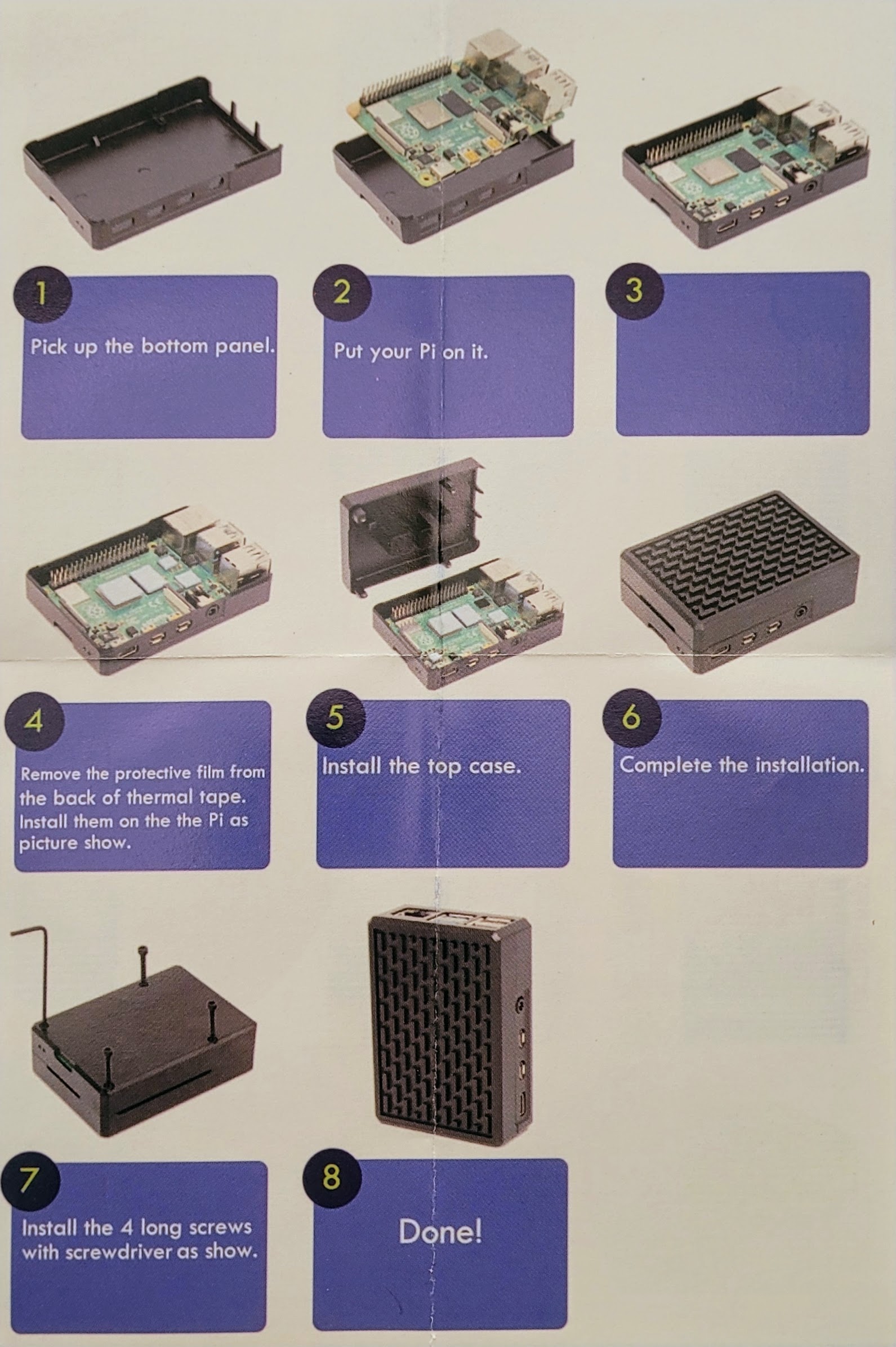
Those simple directions hide the elegant sophistication of this case. It looks simple, right? Surprisingly, it wasn’t. The RPi 4 board did not want to snuggle down into the case. It was the microUSB and audio ports on the side of the RPi 4 board that wouldn’t quite shift into place. The aluminum case has zero flex to it, so after I firmly pressed the board into the case in an attempt to persuade it to fit, it jammed in the case with spectacular firmness. Half an hour of fiddling with an ice pick and a knife blade finally freed the board.
Of course, by then I had dislodged the thermal tape, so I fixed that. Now that I had sussed out where the board was hanging up in the case, I tried slipping that side of the board in first, but then the USB and Ethernet ports got stuck. Eventually, I carefully lowered the board into the case as perfectly horizontal as I could, and once down, began wiggling it to try to get those microUSB ports to snick into the openings in the side of the case. That was another 20 minutes or so, and it didn’t help that it was late at night and I was tired.
Eventually, I thought I got the board close enough to properly positioned to close up the case. Nope, I was wrong. Two of the securing screws go past one edge of the board inside the case, and if the board is not positioned correctly (that is, if the microUSB ports aren’t in the case holes) those screws won’t reach the other part of the case.
I came this close to shelving this for the night, but then thought of the ice pick. With the case assembled but not secured with screws, I used the ice pick in the screw holes to wiggle the RPi 4 into place. Several minutes of this ensued when I heard a satisfying “snick” sound and the case mated perfectly. I grabbed the four screws and quickly tightened them in the tightly mated case.
The takeaway here is that the case is machined to fit the RPi 4 board with precision. That’s not a bad thing, although I expected a little more slop from such an inexpensive case.
Storage and power supply
For storage, I selected a High Endurance microSD card by SanDisk. I don’t know if the special name and slightly higher price really means much, but I figure it can’t hurt. I included a photo of the back of the card package because I’ve never read it. Maybe it will be easier to look over on the computer than in my hand.
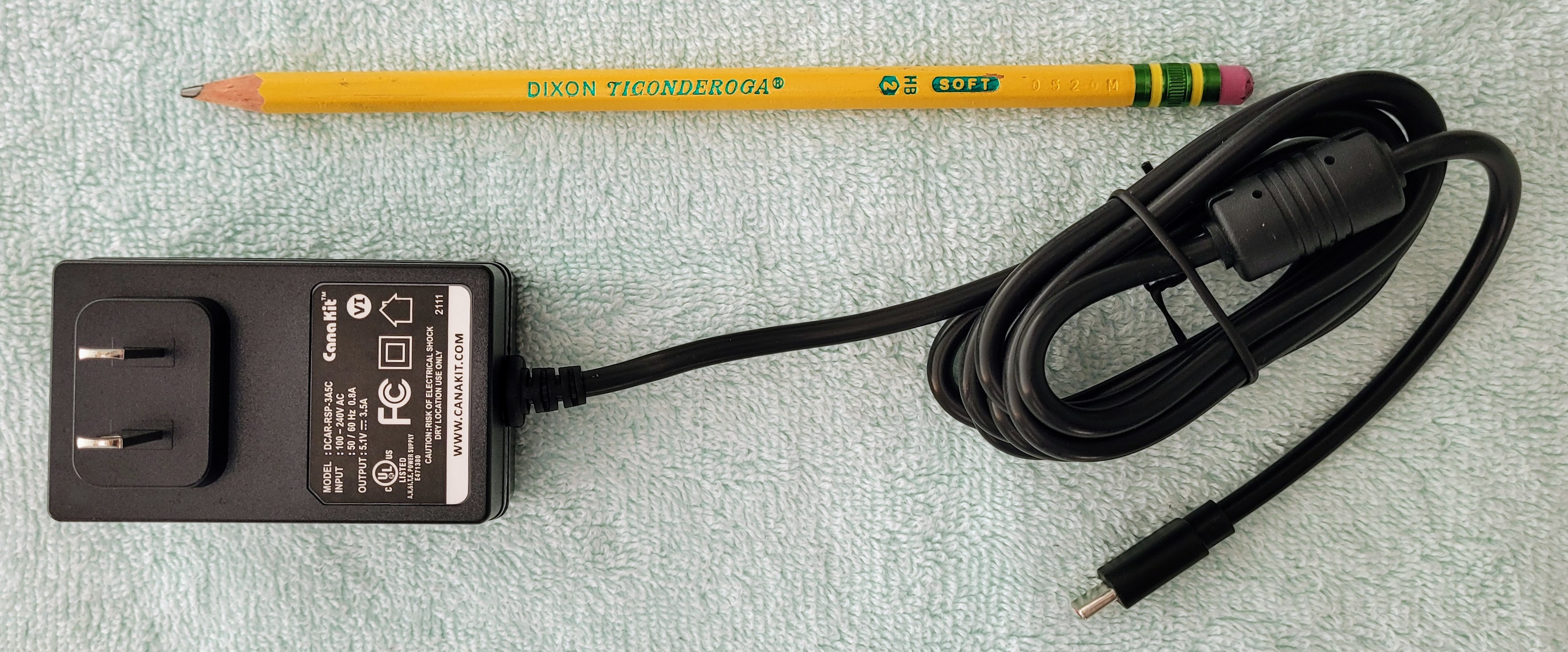
I’ve previously mentioned that I like the CanaKit power supply, so that’s what I bought. Notice how thick the power cable is in the photo below by comparing it to the #2 pencil. It is substantial.
Sound interface
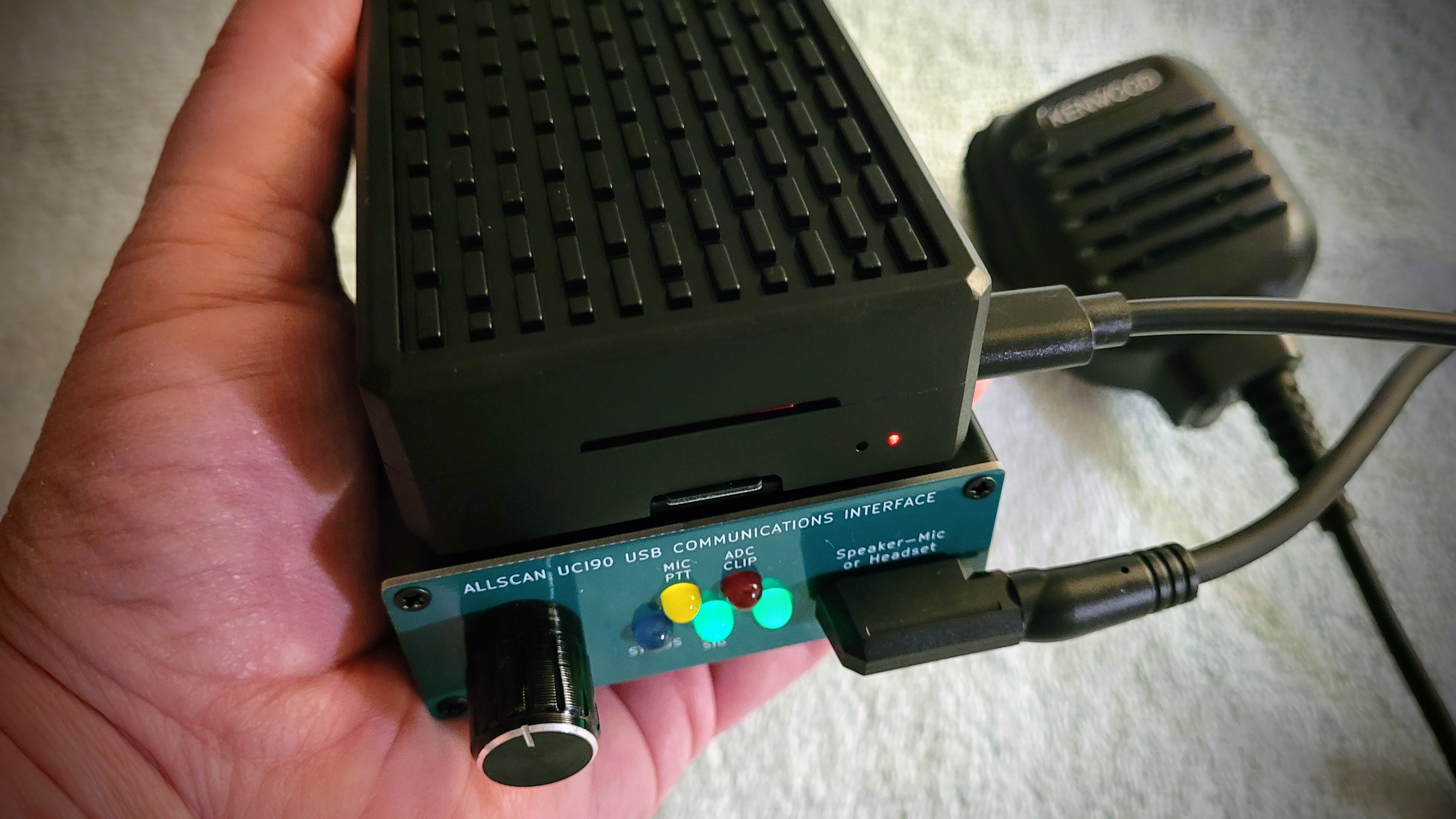
For this build, I selected the AllScan UCI90 USB Communications Interface. I tested an earlier version of the UCI90 and found it worked well, so as I thought about how to make node 588412 somewhat simpler, the UCI90 immediately came to mind. I bought a second unit which is working flawlessly.
I will say that the choice of K-1 speaker-microphone is important. More on that later.
The UCI90 is small, lightweight, and simple to configure and use.
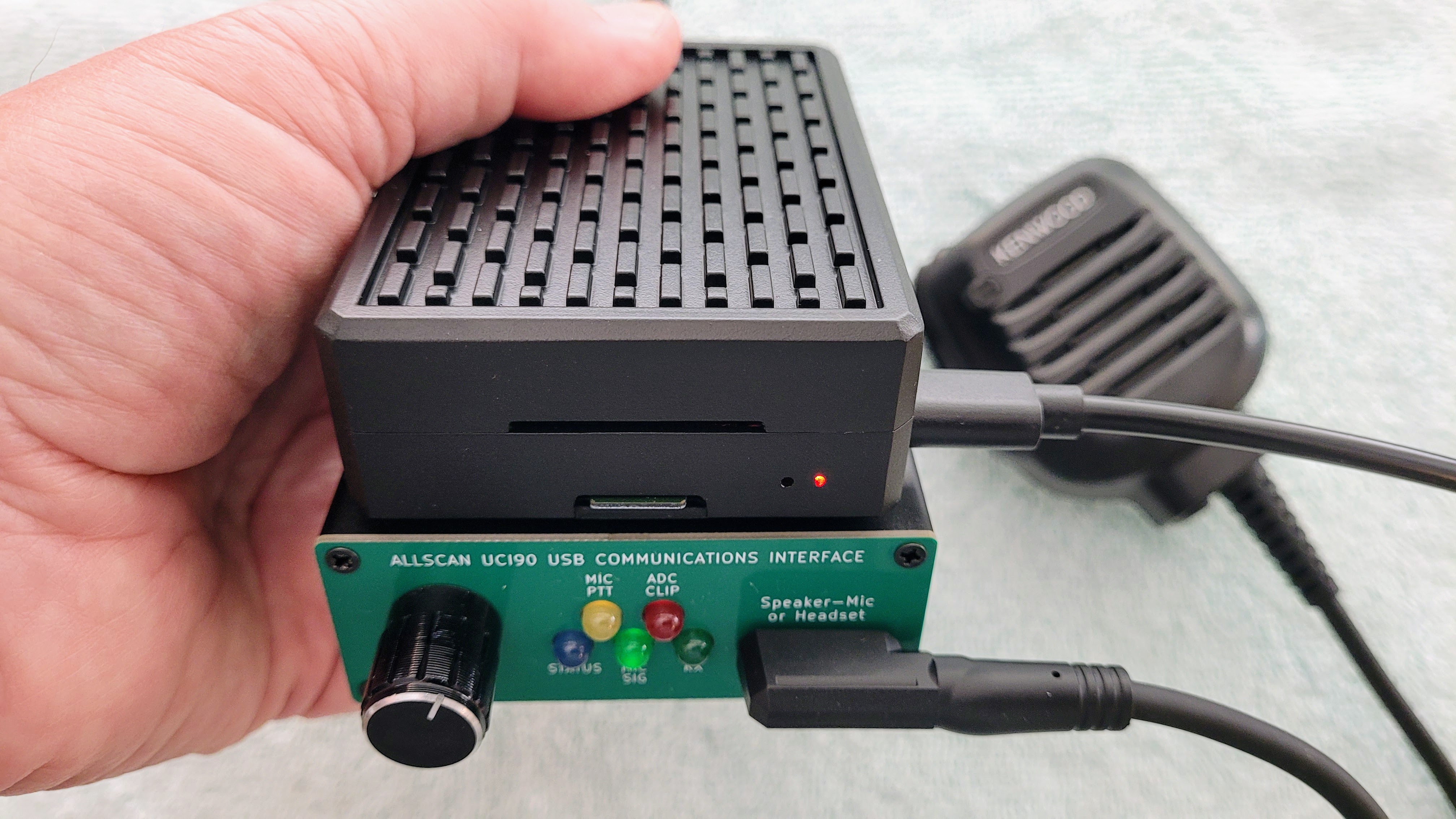
How does it look? Good!
The final assembly looks good. It’s a very compact package. A single short USB cable connects the Raspberry Pi 4 and the AllScan UCI90. I used some double-sided tape to attach the RPi 4 on top of the UCI90.
Software and settings
I used the AllStarLink 3 Appliance image for this node as that gives me the Cockpit interface, a dashboard, and Allmon 3.
After configuring the node in a terminal window with sudo asl-menu, I configured /etc/asterisk/rpt.conf and /etc/asterisk/simpleusb.conf with the settings provided by David Gleason NR9V at https://allscan.info/docs/radioless-node.php#asl-settings. I set the IAX port to 4570 to avoid conflicting with other nodes on my network and forwarded port 4570 to node 588412’s IP address. Those settings got me “on the air.” Later, I’ll work on connecting the node to my SIP phone.
By the way, there are two places in /etc/asterisk/rpt.conf to configure the duplex setting: near the top of the file under [node-main] and at the very bottom of the file. I chose duplex = 3, described in the file as: Full Duplex with telemetry tones and hang time, but no repeated audio.
I then configured the password for Allmon 3 and tested that. I usually have to reboot the node to get that change to take effect, and this time was no exception. The AllStarLink 3 directions say to reload Allmon 3 (sudo systemctl reload allmon3) but that doesn’t seem to do it for me. A reboot works.
Once Allmon 3 was working correctly, I installed AllScan (https://allscan.info), tested it, and then imported my saved favorites file to AllScan.
And then I added the DTMF commands that are supported in AllScan nodes. Find those instructions at https://www.facebook.com/share/1Duar4DUVh/. Lastly, I set the node to announce my LAN IP address at boot time by specifying *690 in the startup macro line at the end of /etc/asterisk/rpt.conf.
Here’s what that sounds like:
I like hearing the IP address because it lets me set the volume on the node to an appropriate level and I’m alerted if the IP address isn’t what I expect, meaning something changed on the network.
Also, I’ve been running the node continuously for 11 hours. The CPU temperature has ranged from 99°F to 104°F. That seems very reasonable for a passively cooled case.
How does the node sound?
This little node sounds great. Below is an audio capture from the ARRL Audio News report, captured with a voice recorder app on my smartphone. I have the node output going through an inexpensive external speaker.
The audio sounds exceptionally clean!
Parts list
Listed below are the parts I used for this project. Links that go to Amazon are affiliate links.
$99.99: CanaKit Raspberry Pi 4 Basic Kit (8GB RAM) (includes the power supply)
$9.99: Aluminium Raspberry Pi 4 Case – Passive Heatsink Cooler for Pi 4 Model B (8GB/4GB/2GB)
$59.99: KENWOOD KMC-45D O E M NEW IN BOX (eBay listing has ended)
Recommended speaker-mics for UCI90
While I’m on the subject of AllStarLink, I bought an AllScan UCI90 interface for a K-1 speaker-microphone. My testing of various speaker-mics means I have several of the K-1 devices. As noted last week, two of them are keepers. I’m adding this second UCI90 so I can use both of those microphones on AllStar.
My choice for the best all-around speaker-mic for the AllScan UCI90 is the Pryme SPM-601:
PRYME® SPM-601 Synergy™ High Perfomance Mid-Size Speaker Mic w/3.5 Earphone Jack with 2-Pin Plug (Compatible with Kenwood, Baofeng and Wuoxon Radio Models) (this is an affiliate link)
My runner-up speaker-mic is almost as good, the Kenwood MC-45D:
Kenwood KMC-45D Military Spec Speaker Microphone with Earpiece Jack, Black (this is an affiliate link)
The only significant reason for the Kenwood to be in second place is sound, but not in the way you might think. I found I had to adjust the sound settings in /etc/asterisk/simpleusb.conf for the mic to have enough volume with my AllStar node. The Pryme speaker-mic worked fine with the default sound settings. Both devices transmit and receive audio as clearly as one could hope with this style of speaker-mic.
The other brands I tested did not do both things well: each device either had a good mic that transmitted cleanly and a speaker that produced muddy sound, or the opposite. The Pryme and Kenwood devices do both things well.
An alternate port didn’t work
There I was, standing up a new AllStar node (578498) late one night. ASL 3 was all loaded and configured: check. Allmon3 configured and tested: check. AllScan installed, configured, and tested: check…no, wait a minute. AllScan was not connecting to the Asterisk Manager. Something was wrong.
Since I already have a node on my network using port 5038 for the Asterisk Manager, I had configured node 578498 to use the non-standard TCP port number 5037. Allmon3 worked fine with /etc/asterisk/manager.conf and /etc/allmon3/allmon3.ini both set to use port 5037. AllScan reads from allmon3.ini to make the connection to the Asterisk Manager, but with port 5037 in play, it wouldn’t make the connection.
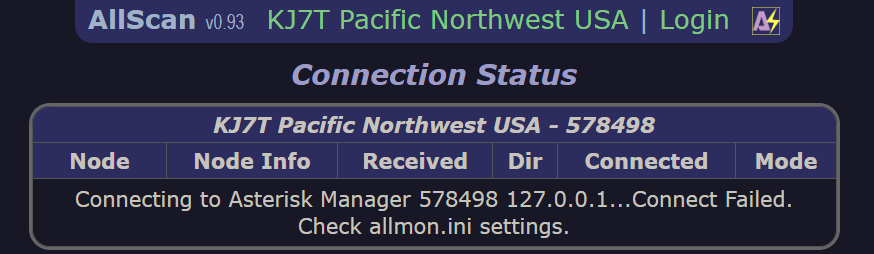
OK, no problem. I’ll completely scrub AllScan off the machine and reinstall it fresh. I did that and got the same result.
Hmmmm… Well, let me try reconfiguring with port 5038. I was surprised when AllScan then came up working normally. Then I reconfigured with port 5037 and AllScan ceased working correctly. I went through this cycle several times, trying to understand why the non-standard port worked with Allmon3 but not with AllScan.
Eventually, I reached out to David NR9V (creator of AllScan) and explained what I was experiencing. A few hours later, David replied: “Apparently, you’re the first to have tried a non-default AMI port # with ASL3 and AllScan.” David found a fix that same day and published version 0.94 of AllScan.
I like the products David creates for amateur radio. His attention to audio quality really shines through with all of his builds. I like the value his products provide. And I like his attention to good customer service. This is a winning combination. Find the AllScan software and his great node builds at https://allscan.info.
Kenwood TS-50S not transmitting
I tried the new-to-me old Kenwood TS-50S transceiver last week but got no RF output. I’m not sure why. When I went back and looked at my photos from that session, I noticed the “on air” indicator was not lit as it should have been if the TS-50S was operating correctly.
What might be the problem? My mind went to an unwelcome scenario: failure of the finals (the final amplifier transistors). However, the TS-50S is also known to have some leaking components that can damage the traces on the board, so I think I need to open the case and take a peek inside.
I will also try to reset the radio to factory settings and test again.
I asked an AI for thoughts on what might be causing the failure to transmit, as indicated by no RF output and the “on air” light not illuminating… Below, I’ve italicized exactly what the AI said.
Kenwood TS-50S “ON AIR” indicator not lit: potential causes and troubleshooting
If the “ON AIR” indicator on your Kenwood TS-50S isn’t lighting up when it should (during transmission), here’s a breakdown of common causes and troubleshooting steps:
1. Power supply and connections
Check the power supply output: Ensure your power supply is delivering the correct voltage to the
TS-50S
, particularly during transmission.
Inspect power supply connections: Verify that power connections are secure at both the power supply and the radio. Loose connections can lead to voltage drops or intermittent operation.
Check for cable or connector damage: Inspect the power cable for any signs of damage, shorts, or poor connections.
2. Internal components and circuits
Capacitor issues: The
TS-50S
is known to have issues with leaky capacitors, particularly on the display board. These leaky capacitors can corrode traces or plated-through holes on the PCB, disrupting power to the “ON AIR” LED.
Final amplifier and relays: Problems with the final amplifier transistor or relays might prevent the radio from transmitting correctly, thus affecting the “ON AIR” indicator.
ALC circuit: The Automatic Level Control (ALC) circuit relies on a stable -8V supply, generated by an astable multivibrator, to regulate power output. If this circuit malfunctions, it could impact transmission and the “ON AIR” indicator.
TX bias line: A faulty component, such as a diode or transistor, on the TX bias line can prevent proper activation of the transmit circuitry.
Internal memory battery: An old or dead internal memory battery can sometimes lead to settings getting corrupted and affect various radio functions.
3. Display board and associated components
Corrosion and damage: Leaks from capacitors can cause corrosion around components on the display board and potentially affect the “ON AIR” LED.
Via damage: The electrolyte leakage can damage plated-through holes (vias) that connect different layers of the circuit board, leading to open circuits and preventing power from reaching the LED.
4. General troubleshooting steps
Consult the service manual: The TS-50S service manual provides detailed schematics and troubleshooting guidance for various problems, including those related to the power supply and transmit circuits.
Methodical troubleshooting: Isolate whether the problem lies with the radio’s internal circuits or external components like the power supply, cable, or antenna system.
Consider professional repair: If you’re not comfortable working with small electronics and soldering, consider seeking assistance from an experienced amateur radio technician or repair service, notes Reddit.
Important Notes:
Safety First: Always disconnect the power supply from the radio and exercise caution when working inside the transceiver.
Capacitor replacement: Many issues in the Kenwood TS-50S are linked to failing capacitors. Consider replacing all small SMD electrolytic capacitors, and potentially the internal memory battery, as a preventative measure or when troubleshooting issues.
By systematically checking these areas, you can increase your chances of identifying the cause of your Kenwood TS-50S’s “ON AIR” indicator issue.
I’m expecting I’ll probably need to replace some capacitors, but I won’t have any idea until I open up the case. Fortunately, I did find a reasonably priced recap kit online. It looks like this:
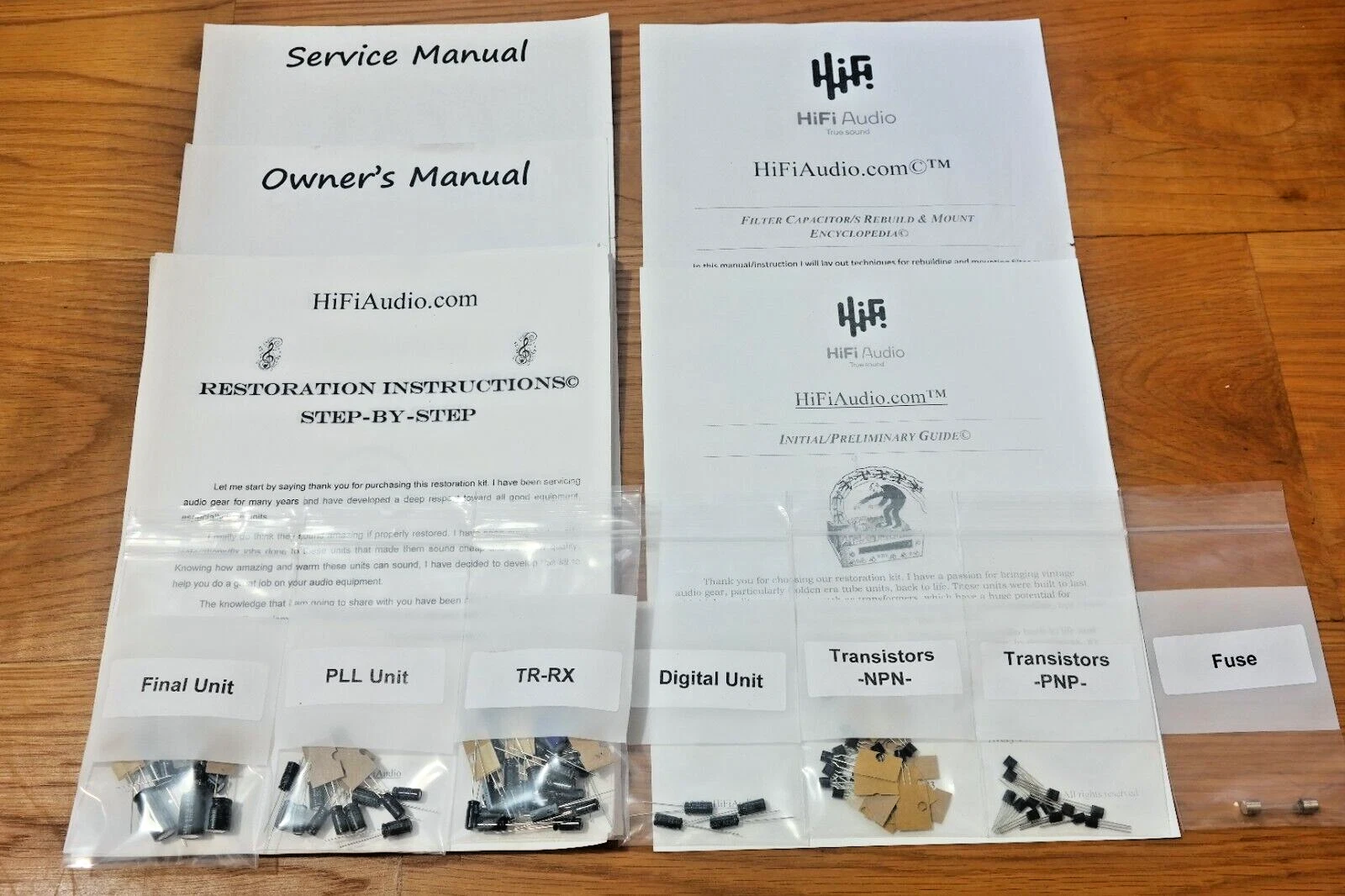
I also located some instructional materials about repairing the TS-50S. The best resource appears to be a list of YouTube videos, so I’ll be watching YouTubes for a while before tackling anything inside the radio.
Why resistance to old and new tech?
I brought up IRLP — the Internet Relay Linking Project — to a radio friend a few weeks ago. His reaction was swift: “that’s old tech.” By tone and words, he made it clear that I should be thinking of technologies that are more current, with newer codecs and better audio quality.
I find this a bit ironic since IRLP first went on the air in 1997. That doesn’t seem all that long ago.
I enjoy the W7RAT repeater in Portland, Oregon. It carries the East Coast Reflector, the Alaska net, and several other nets that I enjoy. Sure, the audio quality is a mixed bag, but usually that’s because of the person transmitting. Many transmissions seem as clear as any other mode we enjoy in amateur radio.
So it is surprising to me that IRLP would be looked down on simply because it isn’t the latest and greatest iteration of a newer system. I use and enjoy M17, DMR, D-STAR, Yaesu System Fusion, AllStarLink and HamVOIP, and occasionally, Echolink. In my experience, the newer the system, the more bugs and system updates. Older systems like IRLP and Echolink are mature and stable.
Of course, the oldest system is CW. I don’t hear many calls to eliminate CW from the modes used by radio amateurs, even though many hams don’t know or use code.
At the same time, I’m hearing amateurs complain about M17. Why another digital mode, they ask. Innovation is part of what attracts me to amateur radio, so the idea that because we already have so many options we shouldn’t explore others seems nonsensical to me. I love the creativity expressed by people trying to make something better, or creating something new. We wouldn’t have any of the systems I listed above without someone getting an idea and carrying it forward. The best ideas take hold and grow.
I don’t have a compelling takeaway other than this observation: perhaps we should not discount older technologies and modes in our quest for the newest shiny thing…and perhaps we shouldn’t complain so much that someone is trying to make a new shiny thing. It may well help us advance our hobby, provide more enjoyment and fulfillment to many hams, and possibly contribute to science and technology.
In closing…
I wish each of you well. One thing this experience with my wife’s stroke has taught me is how amazing are these vessels we occupy, and how quickly our lives can change. We have been relatively fit and enjoyed outdoor activities together. Now we face major changes because her mobility is severely affected.
Another takeaway from this has been that the spouse or caregiver who is in the recovery/rehabilitation facility almost every day receives almost no support. All the attention is on my wife, and that is as it should be. Meanwhile, I’m juggling work, mounting medical bills (because our insurer is denying many costs), preparing the home for my wife, and trying to manage my health. I wish it didn’t feel like an endurance contest!
I am grateful to have so many radio friends. It helps.
73 to all. Remember to touch a radio every day!



Leave a Reply